
Variables
Variables
In the world of System Administration, you are used to "Environment Variables" (like %PATH% in Windows or $HOME in Linux). In Python, a variable is similar, but it operates within the context of the Python Virtual Machine (PVM).
Variables
Concept: Variables
A variable contains data, it can be visualized as a "box". While this isn't entirely correct, it is a valuable abstraction to familiarize ourselves with the concept. The "box" can contain data of any sort, e.g. strings (text such as an IP address), an integer (a number such as a port), a boolean (a true/false value such as an indication of a server's health), ...
Concept: Initializing Variables
Creating a variable or initializing it, is one of the most fundamental concepts in programming. You can initialize a variable by simply writing down a name and assigning a value to it using the assignment operator =.
The assignment operator = expects a variable name on the left side and a value on the right side. In the example below, the name of the variable is my_first_variable and the value assigned to it is the text "Hello World".
my_first_variable = "Hello World"When you write
server_ip = "192.168.1.1"Python does the following:
- It creates a String object in memory containing the value "192.168.1.1".
- It creates a Reference (label) called server_ip.
- It points that label to the object in memory.
If you later write
server_ip = "10.0.0.1"Python does not change the old string; it creates a new string object and moves the label to the new object. The old value is then orphaned since nothing points to it anymore, this signals the Python that the value can be garbage collected (deleted) to free up memory.
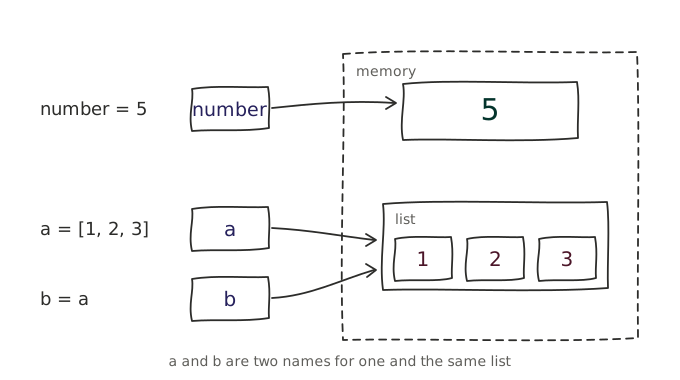
As the image above illustrates, sometimes two different labels can point to the same object in memory. This only happens for complex objects like lists, dictionaries, and sets, which we'll discuss in a later chapter.
Basic data types like strings, integers, and floats are immutable, meaning they cannot be changed once created and if you assign a new variable with an already existing variable containing one of these basic data types, Python will create a new object (copy) in memory and point the new variable to it. The value will therefore be saved twice.
Naming variables
Concept: Naming Variables
When naming variables in Python, there are some important rules you should keep in mind:
- Variable names can only start with a letter or an underscore (
_), not a number. - Variable names can only contain alphanumeric characters (
a-z,A-Z,0-9) and underscores (_). - Variable names are case-sensitive;
age,Age, andAGEare all considered unique. - Variable names cannot be one of Python's reserved keywords such as
if,class, ordef.
While the following are the hard rules, there are also some soft rules that are widely accepted in the Python community:
- Variables names should be in lowercase, with separate words separated by an underscore. This is called snake case.
- Use descriptive names for variables. For example, if you want to save a user's age as a variable,
user_ageis better thanageor an abbreviation likeua. - Avoid using single-character variable names except for iteration variables or the parameter of simple lambda functions.
If you break any of the hard rules, your Python program will throw a SyntaxError: