
Begrippenlijst
Begrippenlijst
This page contains an overview of all the concepts/terms in the Scripting course. Everything found on this page can also be found in the lecture texts, this page is intended for quickly looking up important concepts as a review for exams and not as exclusive study material. We council everyone to attend the lectures and read the full lecture texts.
Filters
Begrippen
Concept: Boolean operators
| Operator | Description | Example | Result |
|---|---|---|---|
and | Returns True if both operands are True | True and False | False |
or | Returns True if at least one operand is True | True or False | True |
not | Returns the negation (opposite) of the argument | not True | False |
== | Returns True if both operands are equal | 5 == 5 "Hello World" == "Hello World" | True |
Concept: Casting
Each of the four primary data types can be converted to another type using the cast functions: str(), int(), float(), and bool().
While almost everything can be cast to a string, not everything can be cast to an integer or float. For example, the string "Hello World" cannot be cast to an integer or float, but the string "42" can be cast to an integer and the string "3.14" can be cast to a float.
If you try to cast a string that cannot be converted to an integer or float, you will get a ValueError:
# This will raise a ValueError
int("Hello World")  # ValueError: invalid literal for int() with base 10: 'Hello World'

# This will successfully cast the string to an integer
int("42")  # 42

# This will successfully cast the string to a float
float("3.14")  # 3.14

# This will cause a ValueError because the string contains a decimal point
int("3.14")  # ValueError: invalid literal for int() with base 10: '3.14'
Everything can be cast to a boolean, but the result may not be what you expect. For example, the string "False" is not the same as the boolean value False. The string "False" is a non-empty string, so it will be cast to True when converted to a boolean. There are only a few values that will be cast to False, everything else will be cast to True:
| Value | Cast to Boolean |
|---|---|
0 | False |
0.0 | False |
"" | False |
None | False |
| Everything else | True |
Concept: Initializing Variables
Creating a variable or initializing it, is one of the most fundamental concepts in programming. You can initialize a variable by simply writing down a name and assigning a value to it using the assignment operator =.
The assignment operator = expects a variable name on the left side and a value on the right side. In the example below, the name of the variable is my_first_variable and the value assigned to it is the text "Hello World".
my_first_variable = "Hello World"Concept: The input() function
The input() function is used to get user input in Python. When called, it displays a prompt (if provided) and waits for the user to type something and press Enter. The input is then returned as a string.
user_input = input("Please enter your name: ")
print("Hello, " + user_input + "!")
# Output: Please enter your name: John
#         Hello, John!
Concept: Integer & Float operators
| Operator | Description | Example | Result |
|---|---|---|---|
+ | Adds two numbers | 5 + 3 | 8 |
- | Subtracts the second number from the first | 5 - 3 | 2 |
* | Multiplies two numbers | 5 * 3 | 15 |
/ | Divides the first number by the second (returns a float) | 5 / 2 | 2.5 |
// | Divides the first number by the second (returns an integer) | 5 // 2 | 2 |
% | Returns the remainder of the division of the first number by the second | 5 % 2 | 1 |
** | Raises the first number to the power of the second | 5 ** 2 | 25 |
< | Less than | 5 < 3 | False |
> | Greater than | 5 > 3 | True |
<= | Less than or equal to | 5 <= 3 | False |
>= | Greater than or equal to | 5 >= 5 | True |
Concept: print()
The print() function is used to display output to the console. It can take multiple arguments, which will be printed with a space in between by default. You can also customize the separator and end character.
sep: Specifies the string that will be used to separate the arguments. Default is a space.end: Specifies the string that will be printed at the end of the output. Default is a newline character.
print("Connecting to server...", end=" ")
print("Success!")
# Output: Connecting to server... Success!

print("Server01", "192.168.1.10", "Online", sep=" | ")
# Output: Server01 | 192.168.1.10 | Online
Output can be further customized using escape characters:
| Escape Character | Description |
|---|---|
\n | New line |
\t | Tab |
\\ | Backslash |
Concept: String operators & functions
Strings support the following operators and functions:
| Operator / Function | Description | Example | Result |
|---|---|---|---|
+ | Concatenates two strings. | "Hello" + " World" | "Hello World" |
* | Repeats a string a specified number of times. | "Hello" * 3 | "HelloHelloHello" |
in | Checks if a substring exists within a string (case sensitve) | "Hello" in "Hello World" "hello" in "Hello World" | True False |
len() | Returns the length of a string (the number of characters) | len("Hello") | 5 |
[] | Accesses a character at a specific index (0-based) | "Hello"[1] | "e" |
f | Formats a string using f-strings | name = "Alice" f"Hello, {name}!" | "Hello, Alice!" |
upper() | Converts all characters in a string to uppercase | "Hello".upper() | "HELLO" |
lower() | Converts all characters in a string to lowercase | "Hello".lower() | "hello" |
strip() | Removes leading and trailing whitespace from a string | " Hello ".strip() | "Hello" |
replace() | Replaces occurrences of a substring with another substring | "Hello World".replace("World", "Universe") | "Hello Universe" |
split() | Splits a string into a list of substrings based on a delimiter | "Hello World".split(" ")[1] | ["Hello", "World"] |
join() | Joins a list of strings into a single string using a delimiter | " ".join(["Hello", "World"]) | "Hello World" |
Concept: Variables
A variable contains data, it can be visualized as a "box". While this isn't entirely correct, it is a valuable abstraction to familiarize ourselves with the concept. The "box" can contain data of any sort, e.g. strings (text such as an IP address), an integer (a number such as a port), a boolean (a true/false value such as an indication of a server's health), ...
Concept: Naming Variables
When naming variables in Python, there are some important rules you should keep in mind:
- Variable names can only start with a letter or an underscore (
_), not a number. - Variable names can only contain alphanumeric characters (
a-z,A-Z,0-9) and underscores (_). - Variable names are case-sensitive;
age,Age, andAGEare all considered unique. - Variable names cannot be one of Python's reserved keywords such as
if,class, ordef.
While the following are the hard rules, there are also some soft rules that are widely accepted in the Python community:
- Variables names should be in lowercase, with separate words separated by an underscore. This is called snake case.
- Use descriptive names for variables. For example, if you want to save a user's age as a variable,
user_ageis better thanageor an abbreviation likeua. - Avoid using single-character variable names except for iteration variables or the parameter of simple lambda functions.
Concept: if Statement
The if statement is the most fundamental control structure in any language.
As the diagram above illustrates, the if block evaluates a condition; if the condition is True, the block of code beneath it is executed. If it is False, that code block is skipped, and the program continues executing the code that follows.
if condition:
    # This code runs only if condition is True
    do_something()

# This code runs regardless of the condition
Concept: else and elif
Should an if statement need to execute code when the condition is False, an else statement can be used to define a block of code that will run in that case.
If the else statement must also conditionally execute code, an elif statement can be used instead. If the condition for the elif statement is True, the code block beneath it will be executed; if it is False, the program will continue to the next elif or else statement (if there are any).
The number of elif statements is unlimited, but there can only be one else statement, and it must be the last statement. There can also only be one if statement, and it must be the first statement.
if condition1:
    # This code runs only if condition1 is True
    do_something()
elif condition2:
    # This code runs only if condition1 is False and condition2 is True
    do_something_else()
elif condition3:
    # This code runs only if condition1 is False and condition3 is True
    do_something_different()
else:
    # This code runs only if both condition1, condition2 and condition3 are False
    do_something_as_a_last_resort()
Concept: Ternary
A ternary operator is a conditional expression that evaluates to one of two values based on a condition. It is often used as a shorthand for simple if-else statements.
A ternary expression should only be used if each branch returns a value. While this isn't a hard rule, i.e. the code doesn't crash if you break it, it is still an important stylistic/semantic rule.
result = value_if_true if condition else value_if_falseConcept: break
The break statement can be used to exit a loop before the loop condition is False in a while loop, or before the loop has iterated over all items in a for loop.
while True:
    command = input("Enter a command (or 'exit' to quit): ")
    if command == "exit":
        break
Concept: continue
The continue statement can be used to skip the rest of the code in the current iteration of a loop and move on to the next iteration.
This can be useful when certain cases must be skipped. Say you want to update the default shell of all users on a system, but you want to skip any user with the nologin shell. You could use a continue statement to skip those users and continue with the next user.
for i in range(100):
    # Skip even numbers
    if i % 2 == 0:
        continue
    print(i)
Concept: Exit code
When a script is executed, it will return an exit code to the operating system when it finishes running. The exit code is a number that indicates whether the script ran successfully or encountered an error.
The exit code is typically 0 for a successful execution, and a non-zero value for an error.
In order to exit a script with a specific exit code, the exit function from the sys module must be used.
import sys
import random

if random.randint(0,1) == 0:
    print("Script ran successfully.")
    sys.exit(0)
else:
    print("Script encountered an error.")
    sys.exit(1)
An error code must be a positive integer no larger than 255. There are a few reserved exit code which should not be used outside their intended purpose. Any other code can be used to indicate an application specific error.
| Exit code | Meaning |
|---|---|
| 0 | Success |
| 1 | General error |
| 2 | Misuse of shell builtins |
| 126 | Command invoked cannot execute |
| 127 | Command not found |
| 128 | Invalid argument to exit |
| 130 | Script terminated by Control-C |
Concept: for loop
A for loop is executed a predetermined number of times, based on the number of items in a sequence (a list of users, a string, or a range of numbers). A for loop is the best choice when the number of iterations is known in advance. Every loop can be expressed as a while loop, but a for loop is more concise and easier to read.
Concept: Build-in modules
Python, like any other programming language, has a set of build-in modules that can be used to extend the functionality of the language beyond simple data types and control structures. The complete list of build-in modules can be found in the Python documentation.
In order to use a build-in module, it must first be imported into the script using the import statement. The code below imports the random module, which contains functions that can be used to generate random numbers and other random data.
import random

random_integer = random.randint(1, 10)
print(f"Random integer between 1 and 10: {random_integer}")
The example above is perfectly valid. However, it is also possible to import only a specific function from a module using the from statement.
from random import randint

random_integer = randint(1, 10)
print(f"Random integer between 1 and 10: {random_integer}")
Concept: range()
The range function is a built-in Python function that generates a sequence of numbers. It is commonly used in for loops to iterate over a specific range of values. The range() function can take one, two, or three arguments:
When called with a single argument, it generates numbers from up to (but not including) the specified value.
for i in range(5):
    print(i, end=" ")
# Output: 0 1 2 3 4
When called with two arguments, it generates numbers from the first argument up to (but not including) the second argument.
for i in range(1, 5):
    print(i, end=" ")
# Output: 1 2 3 4
When called with three arguments, it generates numbers from the first argument up to (but not including) the second argument, incrementing by the third argument.
for i in range(1, 5, 2):
    print(i, end=" ")
# Output: 1 3
While the examples above used positive argmument, the range() function can also accept negative arguments, allowing for reverse iteration.
for i in range(5, 0, -1):
    print(i, end=" ")
# Output: 5 4 3 2 1
Concept: while loop
A while loop requires a test expression that evaluates to True or False. While the test expression evaluates to True, the block of code beneath it is executed. When the test expression evaluates to False, the loop is exited, and the program continues executing the code that follows the loop.
Warning
It is extremely important to ensure that the test expression will eventually evaluate to False, otherwise the loop will never exit, and the program will run indefinitely.
while test_expression:
    # This code runs only if test_expression is True
    do_something()

    # Update the test expression to eventually become False
    test_expression = update_test_expression()
Concept: Comprehension
Comprehensions are a concise way to create new collections (lists, sets[2], or dictionaries) by applying an expression to each item in an existing collection. They allow you to generate a new collection in a single line of code, making your code more readable and concise.
# Create a new list of squares from an existing list of numbers
numbers = [1, 2, 3, 4, 5]
squares = [x ** 2 for x in numbers]

# Create a new list of the squares of even numbers from an existing list of numbers
even_squares = [x ** 2 for x in numbers if x % 2 == 0]

# Create a new dictionary of squares from an existing list of numbers
squares_dict = {x: x ** 2 for x in numbers}
Comprehensions exist for lists and dictionaries, but not for tuples. It is, however, possible to create a tuple using comprehension syntax, but the result will be a generator object, which can be converted to a tuple using the tuple() function.
# Create a new tuple of squares from an existing list of numbers
numbers = [1, 2, 3, 4, 5]
squares_gen = (x ** 2 for x in numbers)  # This creates a generator object
squares_tuple = tuple(squares_gen)  # Convert the generator to a tuple

# Combine the creation of the generator and the conversion to a tuple in one line
squares_tuple = tuple(x ** 2 for x in numbers)
Concept: Dictionary
A dictionary is a collection of key-value pairs, where each key is unique and maps to a specific value. Dictionaries are unordered, meaning that the items do not have a defined order, and they are mutable, allowing you to add, remove, or change items after the dictionary has been created.
Keys must be of an immutable data type, such as strings, numbers (float and int), or tuples of those types. The values can be of any data type, including dictionaries, lists, functions[3], or other complex data structures.
Dictionaries are created using curly braces {} and separating the key-value pairs with commas. Each key is separated from its value by a colon :.
config = {
    "hostname": "srv01.example.com",
    "ip_address": "192.168.1.10",
    "services": ["ssh", "http", "ssh"]
}
Concept: Dictionary methods
A dictionary has several methods that can be used to manipulate its contents. Some of the most commonly used methods are:
get(): Returns the value for a specified key. If the key does not exist, it returns a default value (orNoneif no default is provided).user = {"firstName": "Alice", "lastName": "Healy", "age": 30, "username": "alice_h"} print(user.get("username")) # Output: alice_h print(user.get("gender", "Not specified")) # Output: Not specifiedkeys(): Returns a view object that displays a list of all the keys in the dictionary.user = {"firstName": "Alice", "lastName": "Healy", "age": 30, "username": "alice_h"} print(user.keys()) # Output: dict_keys(['firstName', 'lastName', 'age', 'username'])values(): Returns a view object that displays a list of all the values in the dictionary.user = {"firstName": "Alice", "lastName": "Healy", "age": 30, "username": "alice_h"} print(user.values()) # Output: dict_values(['Alice', 'Healy', 30, 'alice_h'])items(): Returns a view object that displays a list of all the key-value pairs in the dictionary. Those pairs are represented as 2-tuples or pairs.user = {"firstName": "Alice", "lastName": "Healy", "age": 30, "username": "alice_h"} print(user.items()) # Output: dict_items([('firstName', 'Alice'), ('lastName', 'Healy'), ('age', 30), ('username', 'alice_h')])pop(): Removes the specified key and returns the corresponding value. If the key does not exist, it raises aKeyError.user = {"firstName": "Alice", "lastName": "Healy", "age": 30, "username": "alice_h"} removed_value = user.pop("age") print(removed_value) # Output: 30 print(user) # Output: {'firstName': 'Alice', 'lastName': 'Healy', 'username': 'alice_h'}update(): Updates the dictionary with key-value pairs from another dictionary or an iterable of key-value pairs. If a key already exists, its value will be updated.user = {"firstName": "Alice", "lastName": "Healy", "age": 30, "username": "alice_h"} user.update({"age": 31, "gender": "female"}) print(user) # Output: {'firstName': 'Alice', 'lastName': 'Healy', 'age': 31, 'username': 'alice_h', 'gender': 'female'}clear(): Removes all items from the dictionary.user = {"firstName": "Alice", "lastName": "Healy", "age": 30, "username": "alice_h"} user.clear() print(user) # Output: {}
Concept: Iterating over lists or tuples
To iterate over a list or tuple, you can use a for .. in loop. The loop will go through each item in the collection one by one.
users = ["Alice", "Bob", "Charlie", "David"]
for user in users:
print(user, end=" ") # Output: Alice Bob Charlie Davidusers = ("Alice", "Bob", "Charlie", "David")
for user in users:
print(user, end=" ") # Output: Alice Bob Charlie DavidAs the example above shows, the syntax for iterating over a list or tuple is the same. If desired, you can also use the enumerate() function to get both the index and the value of each item in the collection. This function return s a tuple containing the index and the value of each item in the collection, which can be unpacked in the for .. in loop.
users = ["Alice", "Bob", "Charlie", "David"]
for (i, user) in enumerate(users):
print(f"({i}) {user}", end=" ") # Output: (0) Alice (1) Bob (2) Charlie (3) Davidusers = ("Alice", "Bob", "Charlie", "David")
for (i, user) in enumerate(users):
print(f"({i}) {user}", end=" ") # Output: (0) Alice (1) Bob (2) Charlie (3) DavidConcept: Iterating over dictionaries
Iterating over a dictionary can be done using a for .. in loop. By default, the loop will iterate over the keys of the dictionary. However, you can also iterate over the values or key-value pairs using the values() and items() methods, respectively.
config = {
    "hostname": "srv01.example.com",
    "ip_address": "192.168.1.10",
    "services": ["ssh", "http", "ssh"]
}

for key in config:
print(key, end=" ") # Output: hostname ip_address servicesconfig = {
"hostname": "srv01.example.com",
"ip_address": "192.168.1.10",
"services": ["ssh", "http", "ssh"]
}
for value in config.values():
print(value, end=" ") # Output: srv01.example.com 192.168.1.10 ['ssh', 'http', 'ssh']config = {
"hostname": "srv01.example.com",
"ip_address": "192.168.1.10",
"services": ["ssh", "http", "ssh"]
}
for key, value in config.items():
print(f"{key}: {value}", end=" ") # Output: hostname: srv01.example.com ip_address: 192.168.1.10 services: ['ssh', 'http', 'ssh']Concept: List methods & operators
A list contains multiple methods that can be used to manipulate the list. Some of the most commonly used methods are:
append(): Adds an item to the end of the list.users = ["Alice", "Bob"] users.append("Eve") print(users) # Output: ["Alice", "Bob", "Eve"]extend(): Extends the list by appending all the items from another iterable (e.g., another list).users = ["Alice", "Bob"] new_users = ["Eve", "Frank"] users.extend(new_users) print(users) # Output: ["Alice", "Bob", "Eve", "Frank"]insert(): Inserts an item at a specified index in the list.users = ["Alice", "Bob"] users.insert(1, "Eve") print(users) # Output: ["Alice", "Eve", "Bob"]remove(): Removes the first occurrence of a specified item from the list.users = ["Alice", "Bob", "Eve"] users.remove("Eve") print(users) # Output: ["Alice", "Bob"]pop(): Removes and returns the item at a specified index (or the last item if no index is specified).users = ["Alice", "Bob", "Eve"] removed_user = users.pop(1) print(users) # Output: ["Alice", "Eve"] print(removed_user) # Output: "Bob"clear(): Removes all items from the list.users = ["Alice", "Bob", "Eve"] users.clear() print(users) # Output: []len(): Returns the number of items in the list.users = ["Alice", "Bob", "Eve"] length = len(users) print(length) # Output: 3index(): Returns the index of the first occurrence of a specified item in the list.users = ["Alice", "Bob", "Eve"] index_eve = users.index("Eve") print(index_eve) # Output: 2reverse(): Reverses the order of items in the list.users = ["Alice", "Bob", "Eve"] users.reverse() print(users) # Output: ["Eve", "Bob", "Alice"]count(): Returns the number of occurrences of a specified item in the list.users = ["Alice", "Bob", "Eve", "Alice"] count_alice = users.count("Alice") print(count_alice) # Output: 2
There are also operators that can be used with lists:
| Operator | Description | Example | Result |
|---|---|---|---|
+ | Concatenation | ["a", "b"] + ["c", "d"] | ["a", "b", "c", "d"] |
* | Repetition | ["a", "b"] * 2 | ["a", "b", "a", "b"] |
< | Less than | ["a", "b"] < ["c", "d"] | True |
> | Greater than | ["a", "b"] > ["c", "d"] | False |
== | Equal to | ["a", "b"] == ["a", "b"] | True |
!= | Not equal to | ["a", "b"] != ["c", "d"] | True |
in | Membership | "a" in ["a", "b"] | True |
not in | Not membership | "c" not in ["a", "b"] | True |
Concept: Lists
Lists store an ordered collection of data which can be altered and contain duplicate values. Creating a lists can be done using square brackets [] and separating the items with commas.
users = ["Alice", "Bob", "Charlie", "David"]Concept: Slicing
Slicing allows you to select items from a list or string by specifying a range of indices. You can use the syntax list[start:end] to get items from the start index up to, but not including, the end index. You can also omit the start or end index to slice from the beginning or to the end of the list/string, respectively. Additionally, you can specify a step value with list[start:end:step] to skip items in the range.
Concept: Tuple methods & operators
A tuple can be used with all methods for lists, except for those that modify the contents of a list.
len(): Returns the number of items in the tuple.ftp_socket = ('ftp', '192.168.1.65', '21') print(len(ftp_socket)) # Output: 3join(): Joins the elements of a tuple into a string, using a specified separator.ftp_socket = ('ftp', '192.168.1.65', '21') print(' '.join(ftp_socket)) # Output: ftp 192.168.1.65 21count(): Returns the number of occurrences of a specified item in the tuple.users = ('Alice', 'Bob', 'Eve', 'Alice') print(users.count('Alice')) # Output: 2
All operators that work with lists also work with tuples.
| Operator | Description | Example | Result |
|---|---|---|---|
+ | Concatenation | ('a', 'b') + ('c', 'd') | ('a', 'b', 'c', 'd') |
* | Repetition | ('a', 'b') * 2 | ('a', 'b', 'a', 'b') |
< | Less than | ('a', 'b') < ('c', 'd') | True |
> | Greater than | ('a', 'b') > ('c', 'd') | False |
== | Equal to | ('a', 'b') == ('a', 'b') | True |
!= | Not equal to | ('a', 'b') != ('c', 'd') | True |
in | Membership | 'a' in ('a', 'b') | True |
not in | Not membership | 'c' not in ('a', 'b') | True |
Concept: Tuples
Tuples are an ordered and immutable collection of items. Because tuples are immutable, they cannot be modified after they are created. This means that you cannot add, remove, or change items in a tuple.
Tuples are created with parentheses () instead of brackets.
ftp_socket = ('ftp', '192.168.1.65', '21')
ftp_uri = f"ftp://{ftp_socket[1]}:{ftp_socket[2]}"
Concept: Functions
A function is a reusable block of code that performs a single and specific task. Functions allow us to break our code into smaller, manageable pieces, making it easier to read, understand, and maintain.
A function is defined using the def keyword, followed by the function name and parentheses. Within the parentheses, we can define input parameters that the function needs. The code block within every function starts with a colon (:) and is indented.
A function can optionally return an output value using the return keyword and optionally contain a docstring that describes what the function does. This docstring is a string that is placed at the beginning of the function body and is enclosed in triple quotes (""").
def function_name(parameter1, parameter2):
    """
    A function with 2 parameters that returns an output value.
    """
    # code block
    return output_value

def function_name2(parameter1):
    """
    A function with 1 parameters that returns nothing.
    """
    # Code block
    # No return value (None is the default return value)

def function_name3():
    # Code block
    return output_value
The functions can then be called by using their name followed by parentheses, passing in the required arguments.
result = function_name(arg1, arg2)
function_name2(arg1)
result3 = function_name3()
Concept: Function parameters
A function has two types of parameters: positional and keyword parameters. Positional parameters are required and must be passed in the correct order, while keyword parameters are optional and can be passed in any order by specifying the parameter name. Keyword parameters allow for more flexibility in function calls, as they can be omitted or specified in any order. Each keyword parameter must have a default value, which is used if the parameter is not specified in the function call.
def function_name(positional_param1, positional_param2, keyword_param1=None, keyword_param2=None):
    """
    A function with 2 positional parameters and 2 keyword parameters.
    """
    # code block
    return output_value
This function can be called in the following ways:
result1 = function_name(arg1, arg2)
result2 = function_name(arg1, arg2, keyword_param1=arg3)
result3 = function_name(arg1, arg2, keyword_param2=arg4)
Note that the third line specifies a custom value for the keyword_param2 parameter, while the keyword_param1 parameter is omitted and will use its default value of None.
Concept: Common exception types
| Exception | Description |
|---|---|
SyntaxError | Raised when the parser encounters a syntax error. This type of error is usually detected by an editor or IDE. |
NameError | Raised when a local or global name is not found. This error occurs when you try to use a variable that has not been defined. |
TypeError | Raised when an operation or function is applied to an object of inappropriate type. For example, trying to add a string and an integer. |
ValueError | Raised when a function receives an argument of the right type but an inappropriate value. For example, trying to convert a string that does not represent a number into an integer. |
IndexError | Raised when a sequence subscript is out of range. For example, trying to access the 10th element of a list that only has 5 elements. |
KeyError | Raised when a dictionary key is not found. For example, trying to access a key that does not exist in a dictionary. |
ZeroDivisionError | Raised when the second argument of a division or modulo operation is zero. For example, trying to divide a number by zero. |
Concept: open
The open function is used to open a file and returns a file object. The file object can then be used to read from or write to the file, depending on the mode specified when opening the file.
file_handle = open(file, mode="r", encoding=None)The file parameter is either an absolute path or a path relative to the working directory (the directory from which the script is executed, not the directory where the script is located).
The mode parameter is one of the following strings:
| Parameter | Description |
|---|---|
'r' | Open for reading (default). |
'w' | Open for writing, truncating the file first (any existing content is overwritten). |
'x' | Open for exclusive creation, failing if the file already exists. |
'a' | Open for writing, appending to the end of the file if it exists. |
'r+' | Open for reading and writing. |
The encoding parameter specifies the encoding to use when reading or writing the file. If not specified, the default encoding is used, which is platform-dependent (e.g., UTF-8 on most modern systems). A full list of supported encodings can be found in the Python documentation.
Concept: Reading files
There are two common ways to read the contents of a file in Python: using the readlines() method or iterating over the file handle directly. Each has their own advantages and disadvantages, and the choice of which to use depends on the specific use case.
| Reading method | Example | When to use |
|---|---|---|
readlines() | 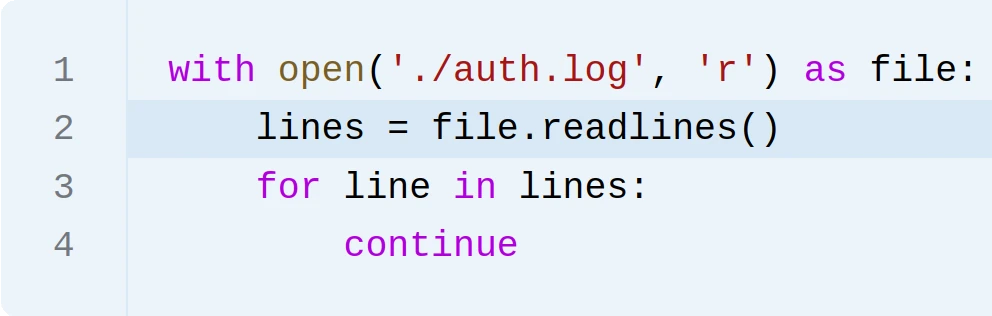 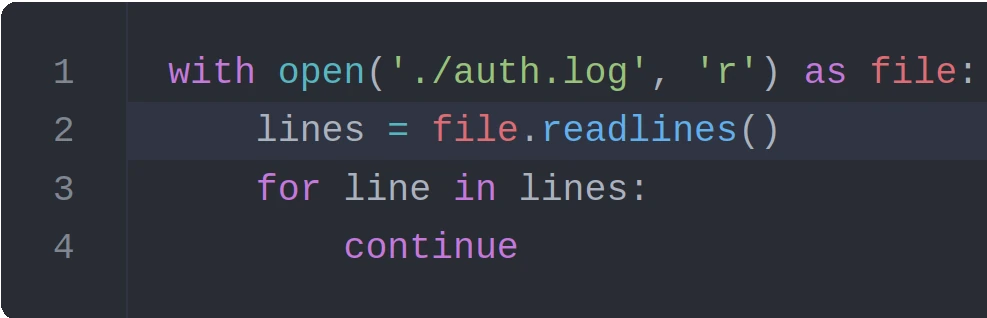 | Use for small files that can fit into memory. Where you need list methods to process the data. |
| Iterating over the file handle | 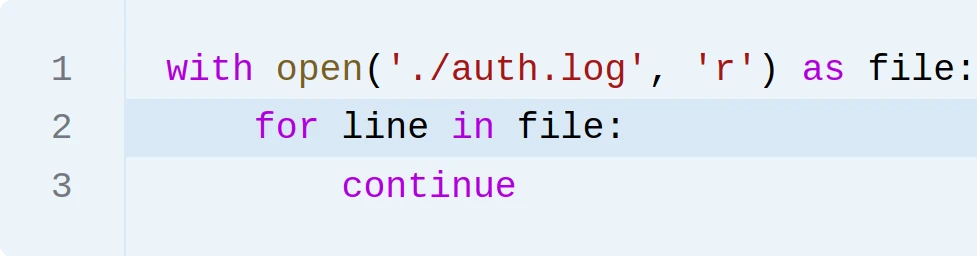 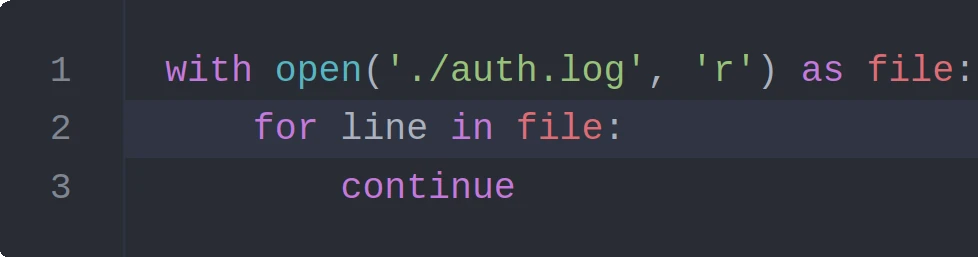 | Use for large files that cannot fit into memory. Where you need to process the data line by line. |
Concept: Try, except, else, finally
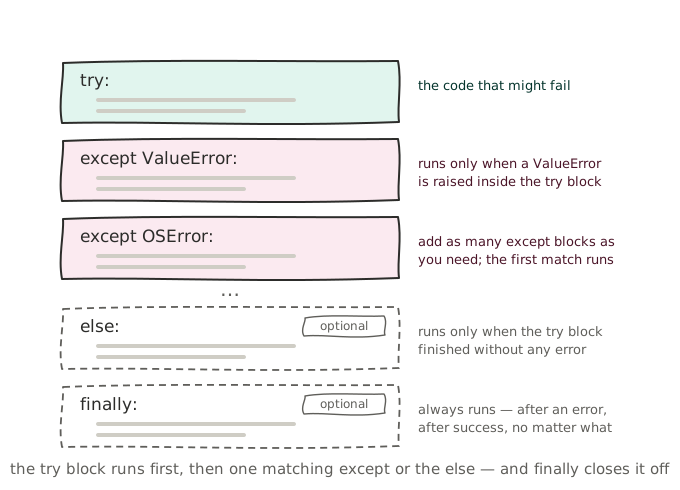
Using try, except, else, and finally, it is possible to write code that handles errors gracefully. One should only use try when you expect an error to occur, not to catch general runtime errors as these usually indicate an error in the program instead of an external factor.
The blocks must be used in a set order and have the following meaning.
try:
    # Code that might throw an error.
    # Keep as little code as possible in the try block to avoid
    # catching errors that you did not expect.

    # Catch an error of a specific type.
    # Use the generic `Exception` class to catch all errors, but
    # this is not recommended as it can hide bugs in your code.
except ExceptionType:
    # Handle the error

    # OPTIONAL
except Exception:
    # Handle a second error type
    # There must be at least ONE except block, but there can be
    # multiple except blocks to handle different error types.

    # OPTIONAL
else:
    # Code to run if no error occurred
    # This is code that depends on the try block running successfully
    # but is not expected to throw an error itself.

    # OPTIONAL
finally:
    # Code to run regardless of whether an error occurred or not
Concept: with
The with statement is used to automatically manage resources, such as file handles, ensuring that they are properly cleaned up after use. When used with file operations, it automatically closes the file when the block of code is exited, even if an error occurs.
This is important because keeping a file open for longer than necessary can lead to resource leaks and other issues such as a file being locked and unavailable for other processes.
with open(file, mode) as file_handle:
    # Perform file operations using file_handle
    ...

# The file is no longer open here, and file_handle is automatically closed.
Concept: Writing files
A file handle can be used to write data to a file using the write() method. The file must be opened in a mode that allows writing, such as 'w', 'a', or 'r+'.
The write() method takes a single string as an argument and writes it to the file. The writelines() method can be used to write a list of strings to the file. Neither of these methods automatically add a newline character at the end of the string, so you must include it if you want to write multiple lines.
The encoding parameter specifies the encoding to use when writing the file. If not specified, the default encoding is used, which is platform-dependent (e.g., UTF-8 on most modern systems). A full list of supported encodings can be found in the Python documentation.
with open(file, mode="w", encoding=None) as file_handle:
    # Write a single string to the file.
    file_handle.write("Hello, World\n")

    # Write a list of strings to the file.
    file.file_handle.writelines(["Line 1", " Line 1, Part II\n", "Line 2"])
Concept: Creating, moving and deleting files and directories
The shutil module provides a high-level interface for file operations. It can be used to copy, move and delete files and directories as well as to create archives (but the zipfile and tarfile modules are preferred).
| Function | Description | Example |
|---|---|---|
| shutil.copy(src, dst) | Copies a file from src to dst. | shutil.copy("file.txt", "backup/file.txt") |
| shutil.copy2(src, dst) | Copies a file from src to dst and preserve as much metadata as possible. | shutil.copy2("file.txt", "backup/file.txt") |
| shutil.copytree(src, dst) | Copies a directory and it's contents from src to dst. | shutil.copytree("dir", "backup/dir") |
| shutil.move(src, dst) | Recursively moves a file or directory from src to dst. | shutil.move("file.txt", "backup/file.txt") |
| shutil.rmtree(path) | Recursively deletes a directory and it's contents. | shutil.rmtree("dir") |
| shutil.which(cmd) | Returns the path of an executable or None if not found. | shutil.which("python") |
| shutil.chown(path, user=None, group=None) | Changes the owner and/or group of a file or directory for a file on a *nix filesystem. | shutil.chown("file.txt", user="sebastiaan") |
The shutil module has two important problem, it cannot be used to delete a single file, only directories and it cannot be used to create directories. For that the pathlib module can be used.
| Function | Description | Example |
|---|---|---|
| Path.unlink() | Deletes a file. | Path("file.txt").unlink() |
| Path.rmdir() | Deletes an empty directory. | Path("dir").rmdir() |
| Path.mkdir(path, parents=False, exist_ok) | Creates a single directory (including non-existing parents when parents=True) | Path("dir").mkdir() |
Concept: The getpass module
| Function | Description | Example |
|---|---|---|
| getpass.getpass(prompt="Password: ") | Asks for input without echoing it to the terminal; use it for passwords, PINs and API keys. | pwd = getpass.getpass("SSH password: ") |
| getpass.getpass(prompt, echo_char="*") | Shows a character for each typed key instead of nothing (Python 3.14+). | pwd = getpass.getpass("Password: ", echo_char="*") |
| getpass.getuser() | Returns the login name of the current user (checks LOGNAME, USER, LNAME and USERNAME first). | getpass.getuser() → 'sebastiaan' |
| getpass.GetPassWarning | Warning raised when input can't be hidden, for example in some IDE consoles. | except getpass.GetPassWarning: |
Concept: Listing files and directories
There are two ways to list files, per folder or recursively.
The iterdir method from the pathlib library can be used to list contents of a single directory. It returns an iterator of Path objects, which can be filtered to only include files or directories.
from pathlib import Path

for path in Path('/some/dir').iterdir():
    # Do something with the Path object.
If the contents of the children must also be listed, the walk method can be used. It returns a list of tuples, each containing a Path object for the directory, a list of subdirectories and a list of files. The subdirectories and files are strings, not Path objects. They can be converted to Path objects by joining them with the directory path.
from pathlib import Path

for root, dirs, files in Path('/some/dir').walk():
    # The dirs and files lists contain strings, not Path objects.
    dir_paths = [root / d for d in dirs]
    file_paths = [root / f for f in files]
Concept: The os module
| Function / attribute | Description | Example |
|---|---|---|
| os.getcwd() | Returns the current working directory. | os.getcwd() → '/home/admin' |
| os.chdir(path) | Changes the current working directory. | os.chdir("/var/log") |
| os.listdir(path) | Returns a list with the names of the entries in a directory. | os.listdir("/etc") |
| os.walk(path) | Walks a directory tree recursively, yielding (dirpath, dirnames, filenames). | for root, dirs, files in os.walk("/var/log"): |
| os.mkdir(path) | Creates a single directory. | os.mkdir("backups") |
| os.makedirs(path, exist_ok=True) | Creates a directory and all missing parent directories. | os.makedirs("/tmp/a/b/c", exist_ok=True) |
| os.remove(path) | Deletes a file. | os.remove("old.log") |
| os.rmdir(path) | Deletes an empty directory. | os.rmdir("backups") |
| os.rename(src, dst) | Renames or moves a file or directory. | os.rename("app.log", "app.log.1") |
| os.chmod(path, mode) | Changes the permissions of a file (Unix-style octal mode). | os.chmod("script.py", 0o755) |
| os.stat(path) | Returns file metadata (size, owner, timestamps, permissions, ...). | os.stat("app.log").st_size |
| os.path.exists(path) | Checks whether a file or directory exists. | os.path.exists("/etc/hosts") → True |
| os.path.isfile(path) | Checks whether a path is an existing file. | os.path.isfile("/etc/hosts") → True |
| os.path.isdir(path) | Checks whether a path is an existing directory. | os.path.isdir("/etc") → True |
| os.path.abspath(path) | Converts a relative path to an absolute path. | os.path.abspath("script.py") → '/home/admin/script.py' |
| os.path.join(a, b, ...) | Joins path components using the correct separator for the OS. | os.path.join("/var", "log", "syslog") |
| os.path.basename(path) | Returns the last component of a path (the file name). | os.path.basename("/var/log/syslog") → 'syslog' |
| os.path.dirname(path) | Returns the directory part of a path. | os.path.dirname("/var/log/syslog") → '/var/log' |
| os.path.getsize(path) | Returns the size of a file in bytes. | os.path.getsize("app.log") → 20480 |
| os.environ | Dictionary-like object containing the environment variables. | os.environ["PATH"] |
| os.getenv(key, default=None) | Returns an environment variable, or the default if it doesn't exist. | os.getenv("HOME", "/tmp") |
| os.getpid() | Returns the process ID of the running script. | os.getpid() → 48213 |
| os.cpu_count() | Returns the number of logical CPUs. | os.cpu_count() → 8 |
| os.name | Name of the OS family: 'posix' (Linux/macOS) or 'nt' (Windows). | if os.name == "nt": |
| os.sep | The path separator of the OS: '/' or '\'. | os.sep → '/' |
| os.uname() | Returns system information (hostname, kernel release, architecture). Unix only. | os.uname().nodename → 'web01' |
| os.geteuid() | Returns the effective user ID; 0 means root. Unix only. | if os.geteuid() != 0: |
Concept: The pathlib module
The pathlib module allows us to construct paths that work on both Windows and *nix variants (Linux, BSD, macOS) and never include an extra or missing slash.
Paths are concatenated using the / operator which in this case has nothing to do with division.
from pathlib import Path

log_file = Path("/var/log") / "nginx" / "access.log"

print(log_file)   # Output: /var/log/nginx/access.log
Concept: File stats
A path object allows us to retrieve information about the file it points to, such as its size and last modification time, using the stat method.
from pathlib import Path

log_file = Path("/var/log/nginx/access.log")
stats = log_file.stat()
The stat method returns a os.stat_result object, which has a lot of attributes. The most useful ones are listed below:
| Attribute | Description |
|---|---|
| st_mode | File type and permissions |
| st_ino | The inode number of Unix and the file index on Windows |
| st_dev | The device the file resides on |
| st_nlink | The number of hard links to the file |
| st_uid | The user ID of the file owner |
| st_gid | The group ID of the file owner |
| st_size | The size of the file in bytes |
| Attribute | Description |
|---|---|
| st_atime | The last access time of the file in seconds since epoch time |
| st_mtime | The last modification time of the file in seconds since epoch time |
| st_ctime | The most recent metadata change expressed in seconds |
| st_birthtime | The creation time of the file in seconds since epoch time |
Concept: Stem and suffix
A path object that links to a file has a stem and a suffix. The stem is the name of the file without the suffix, and the suffix is the extension of the file.
from pathlib import Path

log_file = Path("/var/log/nginx/access.log")
print(log_file.stem)   # Output: access
print(log_file.suffix) # Output: .log
Concept: subprocess
The subprocess module allows us to run other programs from our script.
The run function is the simplest way to run a command. The functions has three important parameters:
- A list of strings that make up the command and its arguments. The first string is the command, the rest are arguments.
capture_output(default:False) which determines whether the output of the command is printed to the terminal or captured in the result object.text(default:False) which determines whether the output is returned as bytes or as a string.
import subprocess

result = subprocess.run(["ping", "-c", "1", "1.1.1.1"])
The result object has a few useful attributes:
| Attribute | Description |
|---|---|
| stdout | The output of the command, as bytes or string depending on the text parameter. |
| stderr | The error output of the command, as bytes or string depending on the text parameter. |
| returncode | The exit code of the command. 0 means success, anything else is an error. |
Concept: The sys module
| Function / attribute | Description | Example |
|---|---|---|
| sys.argv | List of command-line arguments; sys.argv[0] is the script name. | ./backup.py /data → sys.argv[1] is '/data' |
| sys.exit(code) | Stops the script with an exit code (0 = success, anything else = error). | sys.exit(1) |
| sys.stdin | The standard input stream; useful for reading piped input. | for line in sys.stdin: |
| sys.stdout | The standard output stream. | sys.stdout.write("OK\n") |
| sys.stderr | The standard error stream; use it for error messages. | print("Error!", file=sys.stderr) |
| sys.platform | Identifies the platform: 'linux', 'win32', 'darwin', ... | if sys.platform == "linux": |
| sys.version | String with the version of the Python interpreter. | sys.version → '3.14.0 (main, ...)' |
| sys.version_info | Version as a tuple-like object; handy for checking a minimum version. | if sys.version_info < (3, 10): |
| sys.executable | Absolute path of the Python interpreter running the script. | sys.executable → '/usr/bin/python3' |
| sys.path | List of directories Python searches when importing modules. | print(sys.path) |
We do not cover sets in this course, they are a collection type that is similar to lists and dictionaries. Where they differ is that they are unordered and do not allow duplicate values. You can read more about sets in the official Python documentation. ↩︎
Functions wil be covered in the next chapter. ↩︎
Concept: Comments
While most scripts you write will be relatively short and straightforward, it is still a good idea to include comments in your code. Comments are lines of text that are ignored by the computer when the script is run, but they can be very helpful for anyone reading the code (including yourself) to understand what the code is doing.
It is important to write comments that are clear and concise. Comments that tell the reader what the code is doing are not very helpful as they can be inferred from the code itself. Instead, focus on explaining why the code is doing what it is doing, and only explain what the code is doing if it is not immediately obvious. And even then, it's often preferable to rewrite the code to make it more clear rather than adding a comment.
Additionally, comments can be used to separate sections of code such as configuration, input, and output, or to provide context for a specific block of code.