
Data Types
Data Types
Before working with Python variables, it's important to understand data types. A data type describes the kind of value a variable holds. For example, a number, a piece of text, or a list of items. The type of data determines the operations you can perform on it and how much space it occupies in memory.
Dynamic Typing vs. Static Typing
Unlike languages like C# or Java, where you must declare a variable’s type (e.g., int age = 25;), Python is dynamically typed. You can assign a number to a variable and later assign a string to that same variable.
While flexible, this can lead to "Type Errors." For example, if you try to add a number to a string, Python will crash. You must be mindful of the data types you are handling, especially when reading configuration files or API responses.
While Python is dynamically typed, it still has some safeguards, it for example impossible to calculate the sum of a string and an integer. Other languagues such as JavaScript do allow this, which can lead to unexpected results.
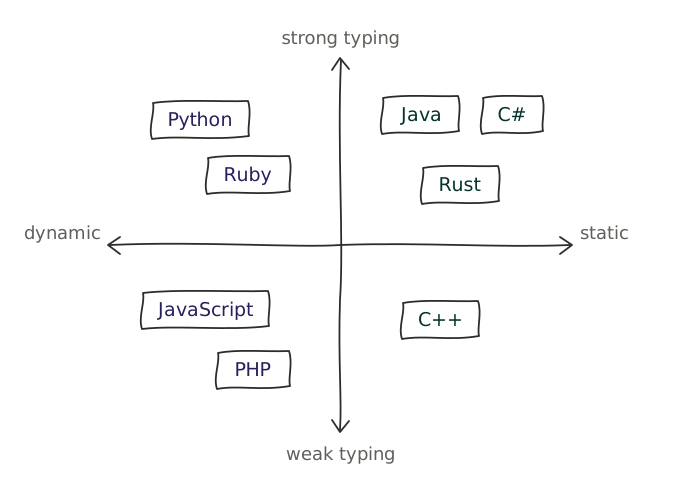
The dynamic-typing nature of Python makes coding really fast and more flexible, but it can lead to unexpected bugs because type errors are detected only when a program runs (at runtime), not when the program compiles (at compile-time). Python executes your code line by line. If it reaches a line where a certain object is expected to behave in a way it's not able to, Python will stop and show an error.
Consider the following example:
started_work_at_tm = 2019
current_year = 2026
current_age = "32"

age_when_work_started = current_age - (current_year - started_work_at_tm)
This code works fine until it reaches the last line, where it tries to subtract an integer from a string. This will raise a TypeError at runtime, and the program will crash.
The runtime-type of a variable can be retrieved at runtime using the type function, as demonstrated below for each of the four primary data types that appear most frequently in infrastructure management: strings, integers, floats, and booleans.
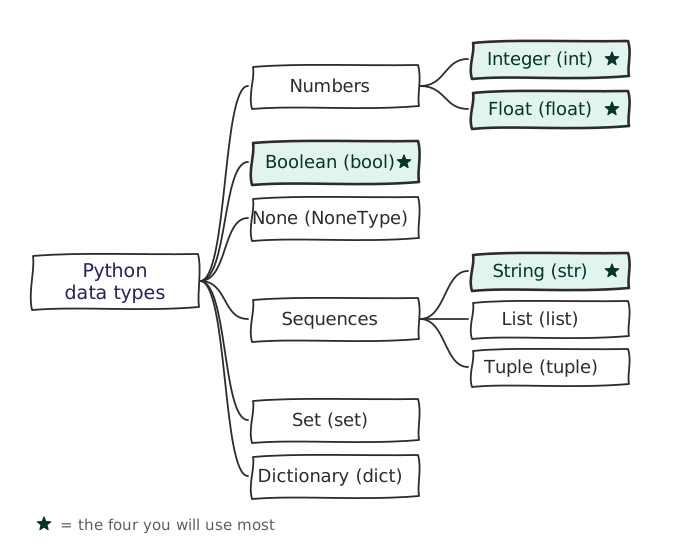
Strings (str)
Strings are sequences of characters wrapped in single (') or double (") quotes. Strings are used for IP addresses, hostnames, usernames, log messages, ...
greeting_1 = "Hello World!"
greeting_2 = 'Hello Universe!'

type_of_greeting_1 = type(greeting_1) # <class 'str'>
type_of_greeting_2 = type(greeting_2) # <class 'str'>
If you need a multi-line string, you can use triple double or single quotes:
my_str_3 = """Multiline
string"""
my_str_4 = '''Another
multiline
string'''
If your string contains either single or double quotation marks, then you have two options:
Use the opposite kind of quotes. That is, if your string contains single quotes, use double quotes to wrap the string, and vice versa:
msg = "It's a sunny day"
quote = 'She said, "Hello World!"'
Escape the single or double quotation mark in the string with a backslash (
\). With this method, you can use either single or double quotation marks to wrap the string itself:msg = 'It\'s a sunny day' quote = "She said, \"Hello!\""
Strings support a number of operations:
Concept: String operators & functions
Strings support the following operators and functions:
| Operator / Function | Description | Example | Result |
|---|---|---|---|
+ | Concatenates two strings. | "Hello" + " World" | "Hello World" |
* | Repeats a string a specified number of times. | "Hello" * 3 | "HelloHelloHello" |
in | Checks if a substring exists within a string (case sensitve) | "Hello" in "Hello World" "hello" in "Hello World" | True False |
len() | Returns the length of a string (the number of characters) | len("Hello") | 5 |
[] | Accesses a character at a specific index (0-based) | "Hello"[1] | "e" |
f | Formats a string using f-strings | name = "Alice" f"Hello, {name}!" | "Hello, Alice!" |
upper() | Converts all characters in a string to uppercase | "Hello".upper() | "HELLO" |
lower() | Converts all characters in a string to lowercase | "Hello".lower() | "hello" |
strip() | Removes leading and trailing whitespace from a string | " Hello ".strip() | "Hello" |
replace() | Replaces occurrences of a substring with another substring | "Hello World".replace("World", "Universe") | "Hello Universe" |
split() | Splits a string into a list of substrings based on a delimiter | "Hello World".split(" ")[1] | ["Hello", "World"] |
join() | Joins a list of strings into a single string using a delimiter | " ".join(["Hello", "World"]) | "Hello World" |
Integers (int) & floats (float)
Integers are whole numbers. You will use these for port numbers, timeout values, counting the number of servers in a cluster, and more. Floats are decimal numbers. These are critical for monitoring metrics, such as CPU load (e.g., 0.75) or memory usage percentages. Both can be positive or negative, though you'll not often see negative values in infrastructure management.
ssh_port = 22
# Show logs starting from 7 days ago
log_start_in_days = -7

memory_usage = 0.75 # 75% memory usage

type_of_ssh_port = type(ssh_port) # <class 'int'>
type_of_log_start_in_days = type(log_start_in_days) # <class 'int'>
type_of_memory_usage = type(memory_usage) # <class 'float'>
Integers and floats support basic arithmetic operations:
Concept: Integer & Float operators
| Operator | Description | Example | Result |
|---|---|---|---|
+ | Adds two numbers | 5 + 3 | 8 |
- | Subtracts the second number from the first | 5 - 3 | 2 |
* | Multiplies two numbers | 5 * 3 | 15 |
/ | Divides the first number by the second (returns a float) | 5 / 2 | 2.5 |
// | Divides the first number by the second (returns an integer) | 5 // 2 | 2 |
% | Returns the remainder of the division of the first number by the second | 5 % 2 | 1 |
** | Raises the first number to the power of the second | 5 ** 2 | 25 |
< | Less than | 5 < 3 | False |
> | Greater than | 5 > 3 | True |
<= | Less than or equal to | 5 <= 3 | False |
>= | Greater than or equal to | 5 >= 5 | True |
Sometimes, you might notice that the result of an operation involving floats has more decimal digits than expected. For example, the sum 0.1 + 0.2 equals 0.30000000000000004 instead of 0.3.
This happens because numbers are stored in binary format, and some fractions cannot be represented exactly in binary. As a result, they are stored as finite approximations, in the same way the fraction 1/3 cannot be represented with a finite number of digits in decimal and is truncated after a certain number of its infinite digits (0.33333...). This leads to small rounding errors.
Booleans (bool)
Booleans represent one of two values: True or False. These are the "switches" or "flags" of your script.
is_server_up = True
is_server_down = False

type_of_is_server_up = type(is_server_up) # <class 'bool'>
type_of_is_server_down = type(is_server_down) # <class 'bool'>
Boolean support logical operations, which are often used in conditional statements to control the flow of a program:
Concept: Boolean operators
| Operator | Description | Example | Result |
|---|---|---|---|
and | Returns True if both operands are True | True and False | False |
or | Returns True if at least one operand is True | True or False | True |
not | Returns the negation (opposite) of the argument | not True | False |
== | Returns True if both operands are equal | 5 == 5 "Hello World" == "Hello World" | True |
Warning
Booleans must be capitalized in Python. Writing true or false will result in a NameError because Python will interpret them as variable names, not boolean values.
Casting
In an ideal situation, every variable would be of the correct type, and you would never need to convert between types. However, in real-world scenarios, you often need to convert between types. For example, when reading data from a configuration file or an API data might be returned as a string, even if it represents a number. In such cases, you can use casting to convert between types.
Concept: Casting
Each of the four primary data types can be converted to another type using the cast functions: str(), int(), float(), and bool().
While almost everything can be cast to a string, not everything can be cast to an integer or float. For example, the string "Hello World" cannot be cast to an integer or float, but the string "42" can be cast to an integer and the string "3.14" can be cast to a float.
If you try to cast a string that cannot be converted to an integer or float, you will get a ValueError:
# This will raise a ValueError
int("Hello World")  # ValueError: invalid literal for int() with base 10: 'Hello World'

# This will successfully cast the string to an integer
int("42")  # 42

# This will successfully cast the string to a float
float("3.14")  # 3.14

# This will cause a ValueError because the string contains a decimal point
int("3.14")  # ValueError: invalid literal for int() with base 10: '3.14'
Everything can be cast to a boolean, but the result may not be what you expect. For example, the string "False" is not the same as the boolean value False. The string "False" is a non-empty string, so it will be cast to True when converted to a boolean. There are only a few values that will be cast to False, everything else will be cast to True:
| Value | Cast to Boolean |
|---|---|
0 | False |
0.0 | False |
"" | False |
None | False |
| Everything else | True |
When creating a new string containing a number, you must the str() function to convert an integer or float to a string, otherwise Python will raise a TypeError:
port_number = 443
ip_address = '192.168.1.137'

# Concatenate the string and integer using str() to convert the integer to a string.
https_socket = ip_address + ':' + str(port_number)  # '192.168.1.137:443'

# This fails with a TypeError because you cannot concatenate a string and an integer directly.
https_socket = ip_address + ':' + port_number  # TypeError: can only concatenate str (not "int") to str
Since Python 3.6 introduced f-strings, you can also use them to format strings with variables of different types without needing to explicitly cast them to strings:
port_number = 443
ip_address = '192.168.1.137'

# Use an f-string to format the string with the integer variable.
https_socket = f"{ip_address}:{port_number}"  # '192.168.1.137:443'