Lists
Lists
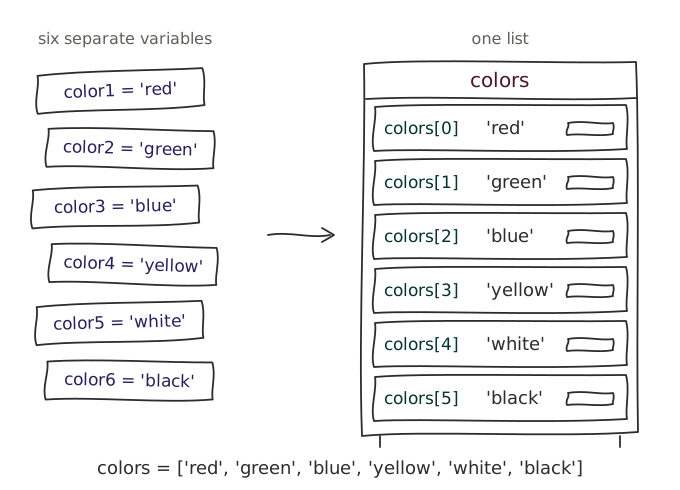
Up until now, we've only worked with single values in our scripts, such as strings or integers. However, in many cases, we need to work with collections of data, such as a list of users, IP addresses, or server names. While each piece of data can be stored in a separate variable, this quickly becomes unmanageable as the number of items increases.
Concept: Lists
Lists store an ordered collection of data which can be altered and contain duplicate values. Creating a lists can be done using square brackets [] and separating the items with commas.
users = ["Alice", "Bob", "Charlie", "David"]Accessing list elements
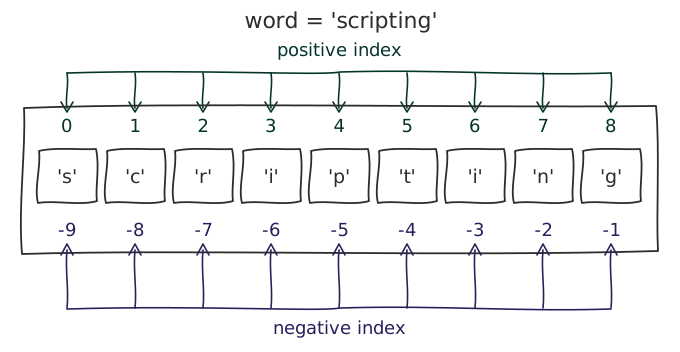
In Python, lists are zero-indexed, meaning that the first item in a list has an index of 0, the second item has an index of 1, and so on.
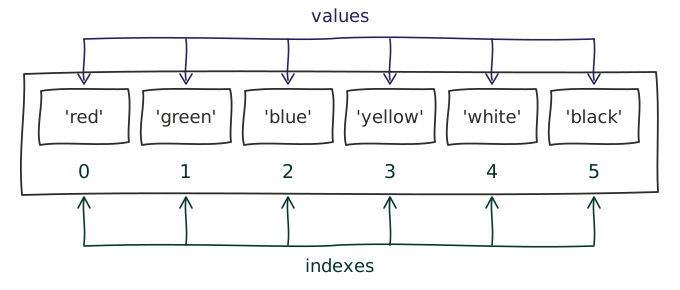
These indices can be used to access individual items in a list.
users = ["Alice", "Bob", "Charlie", "David"]
print(users[0])  # Output: Alice
print(users[3])  # Output: David
While positive indices are the most common way to access list items, Python also supports negative indices, which allow you to access items from the end of the list. The last item in a list has an index of -1, the second-to-last item has an index of -2, and so on.
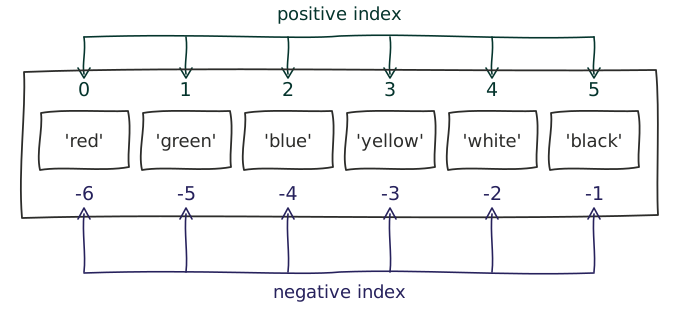
users = ["Alice", "Bob", "Charlie", "David"]
print(users[-4])  # Output: Alice
print(users[-1])  # Output: David
Note
Strings are a special, immutable type of list, where each character in the string is an item in the list. You can therefore use the same indexing techniques on strings as you would on lists.
Retrieve the index of an item in a list
It is also possible to do the reverse, and retrieve the index of an item in a list using the index() method. This method returns the index of the first occurrence of the specified item in the list. Since this method runs through the list starting from position 0, it will always return a positive index, never a negative one.
users = ["Alice", "Bob", "Charlie", "David", "Charlie"]

index_charlie = users.index("Charlie")
print(index_charlie) # Output: 2
Note that the first occurrence of "Charlie" is at index 2, so that is the value returned by the index() method.
Exceptions
Both the indexer [] and index() method will raise an exception if the specified index or item does not exist in the list. Both positive and negative indices can produce errors.
users = ["Alice", "Bob", "Charlie", "David", "Charlie"]

users[5]
users[-6]
users.index("Anna")
The code above will produce the following errors (assuming only one of the three lines is executed at a time):
As the examples above show, it is important to ensure that the index or item you are trying to access exists in the list before attempting to access it. This can be done by checking the length of the list using the len() function, or by using the in operator to check if an item exists in the list.
Elements as variables
An item in a list can be updated by assigning a new value to the index of the item you want to change. You can view list[index] as a variable. This means that anything you can do with a variable (of a given type), you can also do with a list item of the same type.
users = ["Alice", "Bob", "Charlie", "David", "Charlie"]

# Each item in the list can be treated as a variable.
# We could therefore assign a new value to it, call a method, ...

# Charlie was entered twice, let's fix that and add Anna (who was forgotten).
users[-1] = "Anna"

# Methods can be called on an indexer expression just like on a normal variable.
# This can happend with or without assignment:
print(users[0].upper()) # Output: ALICE

users[0] = users[0].upper()
print(users[0]) # Output: ALICE
Working with lists
Concept: List methods & operators
A list contains multiple methods that can be used to manipulate the list. Some of the most commonly used methods are:
append(): Adds an item to the end of the list.users = ["Alice", "Bob"] users.append("Eve") print(users) # Output: ["Alice", "Bob", "Eve"]extend(): Extends the list by appending all the items from another iterable (e.g., another list).users = ["Alice", "Bob"] new_users = ["Eve", "Frank"] users.extend(new_users) print(users) # Output: ["Alice", "Bob", "Eve", "Frank"]insert(): Inserts an item at a specified index in the list.users = ["Alice", "Bob"] users.insert(1, "Eve") print(users) # Output: ["Alice", "Eve", "Bob"]remove(): Removes the first occurrence of a specified item from the list.users = ["Alice", "Bob", "Eve"] users.remove("Eve") print(users) # Output: ["Alice", "Bob"]pop(): Removes and returns the item at a specified index (or the last item if no index is specified).users = ["Alice", "Bob", "Eve"] removed_user = users.pop(1) print(users) # Output: ["Alice", "Eve"] print(removed_user) # Output: "Bob"clear(): Removes all items from the list.users = ["Alice", "Bob", "Eve"] users.clear() print(users) # Output: []len(): Returns the number of items in the list.users = ["Alice", "Bob", "Eve"] length = len(users) print(length) # Output: 3index(): Returns the index of the first occurrence of a specified item in the list.users = ["Alice", "Bob", "Eve"] index_eve = users.index("Eve") print(index_eve) # Output: 2reverse(): Reverses the order of items in the list.users = ["Alice", "Bob", "Eve"] users.reverse() print(users) # Output: ["Eve", "Bob", "Alice"]count(): Returns the number of occurrences of a specified item in the list.users = ["Alice", "Bob", "Eve", "Alice"] count_alice = users.count("Alice") print(count_alice) # Output: 2
There are also operators that can be used with lists:
| Operator | Description | Example | Result |
|---|---|---|---|
+ | Concatenation | ["a", "b"] + ["c", "d"] | ["a", "b", "c", "d"] |
* | Repetition | ["a", "b"] * 2 | ["a", "b", "a", "b"] |
< | Less than | ["a", "b"] < ["c", "d"] | True |
> | Greater than | ["a", "b"] > ["c", "d"] | False |
== | Equal to | ["a", "b"] == ["a", "b"] | True |
!= | Not equal to | ["a", "b"] != ["c", "d"] | True |
in | Membership | "a" in ["a", "b"] | True |
not in | Not membership | "c" not in ["a", "b"] | True |
Slicing
It is often useful to retrieve a subset of items from a list, rather than a single item. You may have a list of servers and only want to retrieve the first three servers to test the script on.
Concept: Slicing
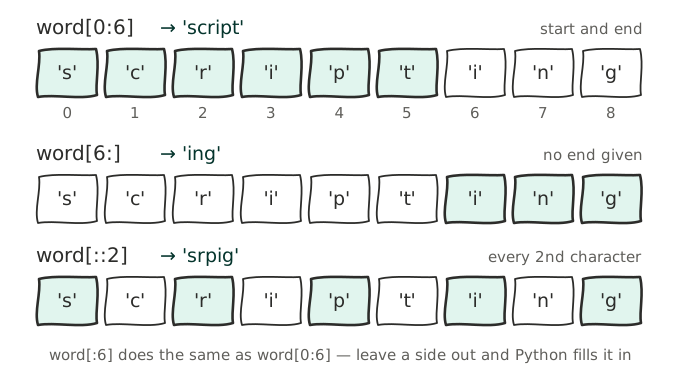
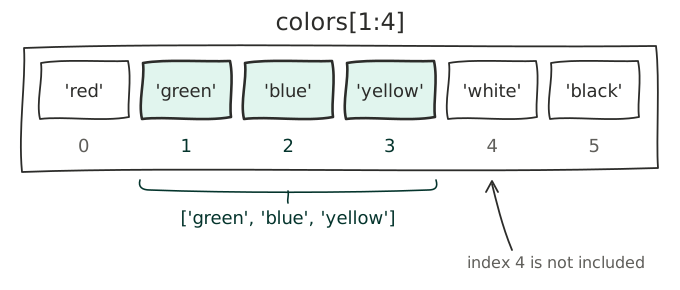
Slicing allows you to select items from a list or string by specifying a range of indices. You can use the syntax list[start:end] to get items from the start index up to, but not including, the end index. You can also omit the start or end index to slice from the beginning or to the end of the list/string, respectively. Additionally, you can specify a step value with list[start:end:step] to skip items in the range.
Slicing allows you to retrieve a range of items from a list in three ways, we'll look at each of them in turn.
Basic slicing
The most basic form of slicing is to specify a start and end index, separated by a colon :. All items from the start index up to, but not including, the end index will be returned.
users = ["Alice", "Bob", "Charlie", "David", "Charlie"]

basic_slice = users[1:3]
print(f"Basic slice [1:3]: {basic_slice}") # Output: ['Bob', 'Charlie']
Open-ended slicing
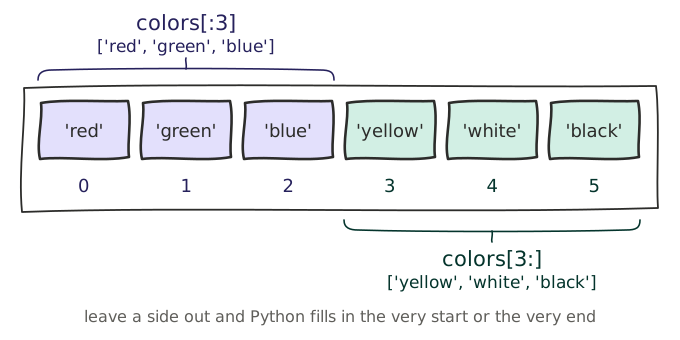
A slice can also be open-ended, meaning that either the start or end index is omitted. If the start index is omitted, the slice will start at the beginning of the list and continue up to, but not including, the end index. If the end index is omitted, the slice will continue to the end of the list.
users = ["Alice", "Bob", "Charlie", "David", "Charlie"]

first_three_users = users[:3]
print(f"First three users slice [:3]: {first_three_users}")  # Output ["Alice", "Bob", "Charlie"]

# You could also use a negative index to indicate the start.
last_three_users = users[-3:]
print(f"Last three users slice [-3:]: {last_three_users}") # Output: ["Charlie", "David", "Charlie"]
Step slicing
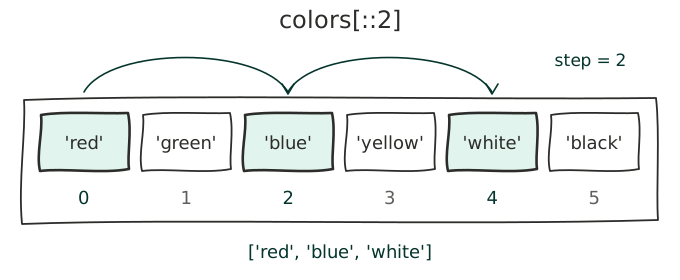
A third parameter can be added to a slice, which specifies the step size. This allows you to skip items in the list, returning every nth item, where n is the step size.
users = ["Alice", "Bob", "Charlie", "David", "Charlie"]

every_second_user = users[::-2]
print(f"Every second user slice [::-2]: {every_second_user}") # Output: ["Charlie", "Charlie", "Alice"]
Note
Strings are a special, immutable type of list, where each character in the string is an item in the list. You can therefore use the same slicing techniques on strings as you would on lists.