
Functions
Functions
We've already used quite a lot of functions in the previous chapters, such as the print(), len(), and input() functions. However, we haven't really explained what they are or how to create our own. In this chapter, we'll cover these topics.
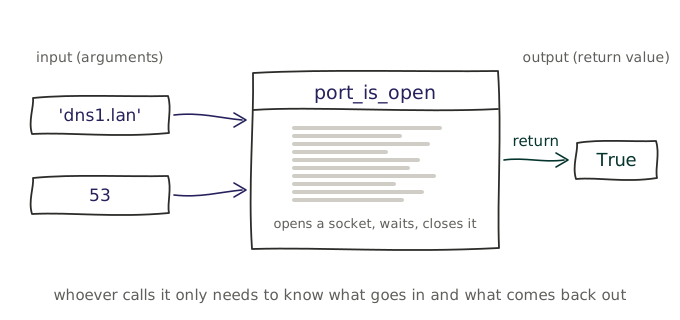
Functions can optionally take input parameters and return output values, allowing us to pass data into the functions that is then used to perform the task, and return results back. Depending on the parameters, the function can perform the same task in different ways, making it more flexible and adaptable to different situations. However, given the same parameters, a function must always return the same output, which makes it predictable and reliable.
There are multiple reasons to use functions in our code, we'll discuss the most important ones below.
Black box
To use a function, we need only know its name, the parameters it takes, and the output it returns.
We've used this concept before, think of all the methods we've used on strings, lists, and dictionaries. We've talked about what they do, but not how they do it. Python offers a lot of built-in functions, allowing us to write short and readable code without having to know or care about how they work internally.
Readability
Up until now, we've written all of our code sequentially in a single script, but as our scripts grow larger, it becomes harder to read and maintain them. Functions allow us to break our code into smaller, reusable pieces, making it easier to understand and manage.
Consider an if-else statement which has to execute a number of lines in each branch. If we write all the code for a branch directly in the if or else block, it can become quite long and difficult to read. Instead, we can create a function for each branch and call the appropriate function in the if or else block.
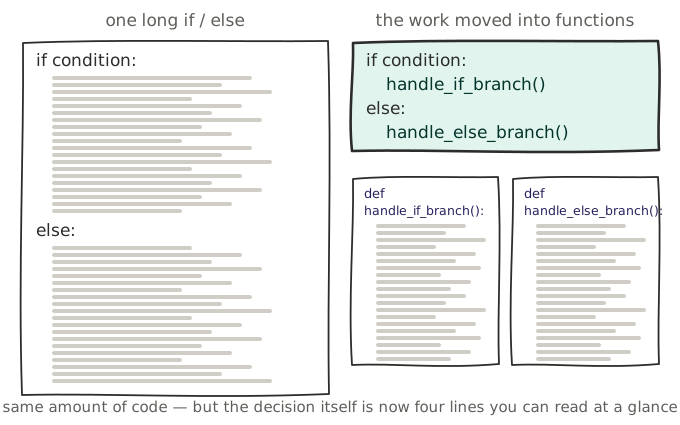
The if-else statement is now much easier to read, there is less indented code and the logic is clearer.
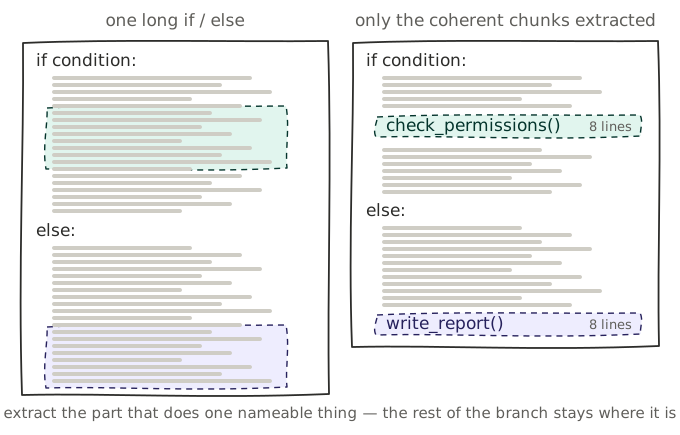
It should be clear that functions help to create more readable code. However, the example above is a bit unrealistic because it's rarely the case that an entire branch can be represented by a single function. A function should do one thing and do it well. If a function is doing too many things, it should be split into multiple functions.
The example below illustrates a more realistic scenario where a function is used to encapsulate a specific task. While the branch of the if-else statement is still doing multiple things, a chunk of the code has been extracted into a function, which makes the branch easier to read and understand.
Reusability
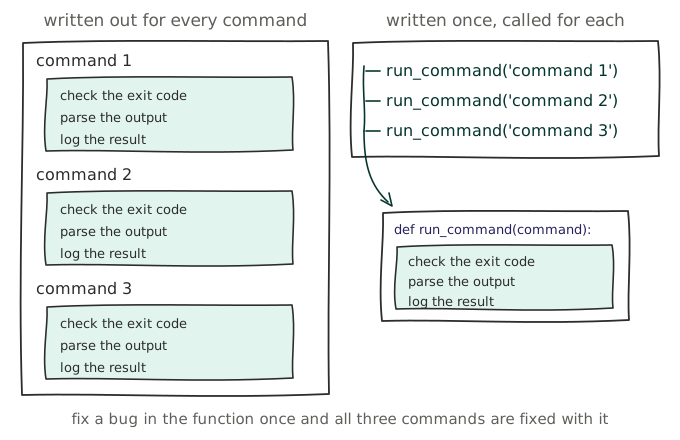
Function do not only help to make code more readable, but they also allow us to reuse code in multiple places. Consider a script that needs to call multiple cli commands. For each command, the exit code needs to be checked, the output must be parsed, and the result must be logged. If we write all of this code for each command, it will be repeated multiple times, which makes the code harder to read and maintain. Instead, we can create a function that encapsulates this logic and call it for each command, which makes the code more readable and maintainable.
Defining a function
Concept: Functions
A function is a reusable block of code that performs a single and specific task. Functions allow us to break our code into smaller, manageable pieces, making it easier to read, understand, and maintain.
A function is defined using the def keyword, followed by the function name and parentheses. Within the parentheses, we can define input parameters that the function needs. The code block within every function starts with a colon (:) and is indented.
A function can optionally return an output value using the return keyword and optionally contain a docstring that describes what the function does. This docstring is a string that is placed at the beginning of the function body and is enclosed in triple quotes (""").
def function_name(parameter1, parameter2):
    """
    A function with 2 parameters that returns an output value.
    """
    # code block
    return output_value

def function_name2(parameter1):
    """
    A function with 1 parameters that returns nothing.
    """
    # Code block
    # No return value (None is the default return value)

def function_name3():
    # Code block
    return output_value
The functions can then be called by using their name followed by parentheses, passing in the required arguments.
result = function_name(arg1, arg2)
function_name2(arg1)
result3 = function_name3()
Anatomy of a function
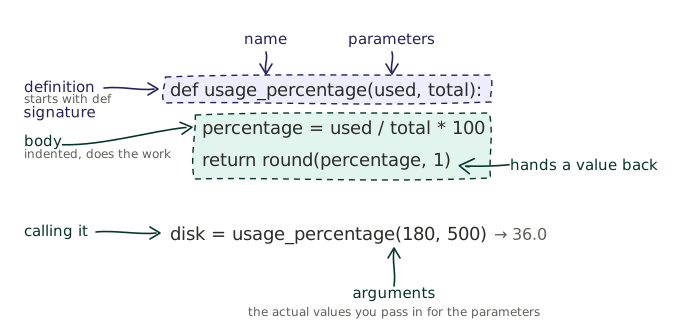
The line that defines a function is called its definition or signature. The parameters that are defined between the parentheses are called parameters in the definition, but become arguments once the function is called. The code block that is indented after the definition is called the body of the function.
Warning
Variables that are defined inside a function are called local variables and are only accessible within the function. Once the function has finished executing, the local variables are destroyed and their values are lost.