
Error Handling
Error Handling
Python, like other programming languages, differentiates between three types of errors:
- Syntax Errors: These occur when the code is not written according to the rules of the Python language. For example, missing a colon at the end of a function definition or using an undefined variable.
- Logical Errors: These occur when the code runs without crashing, but produces incorrect results. For example, using the wrong formula to calculate a value. These errors are often called "bugs".
- Runtime Errors: These occur while the program is running, often due to unexpected conditions. For example, trying to divide by zero or accessing a list index that doesn't exist.
In this chapter, we focus on Runtime Errors and how to handle them gracefully using Python's exception handling mechanism.
Exception types
Concept: Common exception types
| Exception | Description |
|---|---|
SyntaxError | Raised when the parser encounters a syntax error. This type of error is usually detected by an editor or IDE. |
NameError | Raised when a local or global name is not found. This error occurs when you try to use a variable that has not been defined. |
TypeError | Raised when an operation or function is applied to an object of inappropriate type. For example, trying to add a string and an integer. |
ValueError | Raised when a function receives an argument of the right type but an inappropriate value. For example, trying to convert a string that does not represent a number into an integer. |
IndexError | Raised when a sequence subscript is out of range. For example, trying to access the 10th element of a list that only has 5 elements. |
KeyError | Raised when a dictionary key is not found. For example, trying to access a key that does not exist in a dictionary. |
ZeroDivisionError | Raised when the second argument of a division or modulo operation is zero. For example, trying to divide a number by zero. |
Try & except
The scripts that we've written up until now have been rather simple, any runtime errors would have been caused by faulty logic. However, when dealing with files, it is possible that an error occurs due to external factors, such as a file not existing or being inaccessible.
A script that fails due to an unhandled exception will terminate immediately, which is not ideal. To handle such situations, we can use the try and except blocks to catch exceptions and handle them gracefully.
Concept: Try, except, else, finally
Using try, except, else, and finally, it is possible to write code that handles errors gracefully. One should only use try when you expect an error to occur, not to catch general runtime errors as these usually indicate an error in the program instead of an external factor.
The blocks must be used in a set order and have the following meaning.
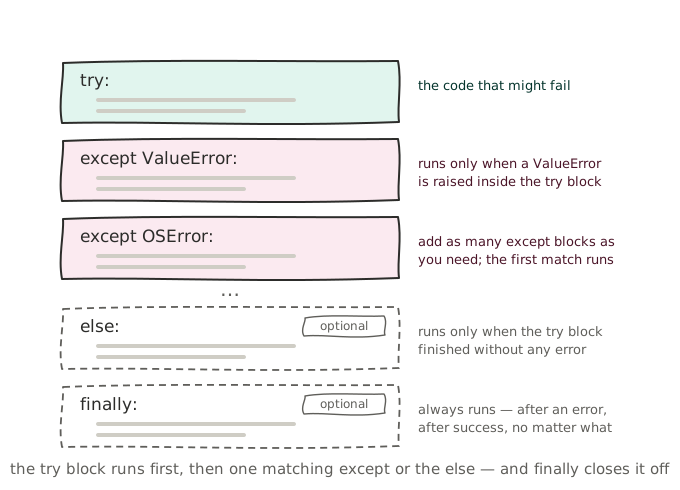
try:
    # Code that might throw an error.
    # Keep as little code as possible in the try block to avoid
    # catching errors that you did not expect.

    # Catch an error of a specific type.
    # Use the generic `Exception` class to catch all errors, but
    # this is not recommended as it can hide bugs in your code.
except ExceptionType:
    # Handle the error

    # OPTIONAL
except Exception:
    # Handle a second error type
    # There must be at least ONE except block, but there can be
    # multiple except blocks to handle different error types.

    # OPTIONAL
else:
    # Code to run if no error occurred
    # This is code that depends on the try block running successfully
    # but is not expected to throw an error itself.

    # OPTIONAL
finally:
    # Code to run regardless of whether an error occurred or not
The following example demonstrates how multiple except blocks can be used to handle different types of exceptions that may occur while processing a list of files. Note that the final except Exception block is a catch-all for any unexpected errors that may occur, and the finally block ensures that the file handle is closed regardless of whether an error occurred or not.
We previously used the with statement to automatically close file handles, here we choose to manually open and close the file handles to demonstrate the use of finally.
import csv

files = ['users.csv', 'users_errors.csv', 'users_utf16.csv', "users10.csv"]

for file in files:
    try:
        # This line will error for the file 'users10.csv', which error is caught in the first catch block.
        file_handle = open(file, 'r')

        # This line will error for users_utf16.csv because we've not added a encoding parameter.
        csv_reader = csv.DictReader(file_handle, delimiter=',')

        for line in csv_reader:
            # This line will error for the first line in users_errors.csv.
            # While the second except block will catch this, the remaining lines in the file won't be processed.
            # The error causes the next file in the list to be processed.
            print(f"Created user {line['username']} for {line['full_name']} with shell {line['shell']}")

    except FileNotFoundError:
        print(f"ERROR: File {file} does not exist")
    except KeyError:
        print(f"ERROR: Could not process `{line}`, a required key does not exist.")
    except Exception:
        # This is a general catch block that catches every possible error.
        print(f"ERROR: An unexpected error occurred while processing `{file}`")
    finally:
        file_handle.close()
This code will produce the following output:
Created user jsmith for John Smith with shell /bin/bash
Created user mgarcia for Maria Garcia with shell /bin/bash
Created user apatel for Amit Patel with shell /bin/bash
Created user lchen for Lisa Chen with shell /bin/bash
Created user rwilliams for Robert Williams with shell /bin/bash
Created user sdubois for Sophie Dubois with shell /bin/bash
Created user tvermeer for Tom Vermeer with shell /bin/bash
Created user kjanssens for Kevin Janssens with shell /bin/bash
Created user nvandenberg for Nina Vandenberg with shell /bin/bash
Created user ohassan for Omar Hassan with shell /bin/bash
Created user ebakker for Emma Bakker with shell /bin/bash
Created user pmartin for Pierre Martin with shell /bin/rbash
Created user fclaes for Fien Claes with shell /bin/bash
Created user dwouters for Dries Wouters with shell /bin/bash
Created user hleroy for Hugo Leroy with shell /bin/bash
Created user lwei for 李伟 with shell /bin/bash
ERROR: Could not process `{'username': 'jsmith', 'full_name': 'John Smith', 'role': 'admin', 'department': 'IT'}`, a required key does not exist.
ERROR: An unexpected error occurred while processing `users_utf16.csv`
ERROR: File users10.csv does not exist