
Variables and Data Types
Variables and Data Types
In the world of System Administration, you are used to “Environment Variables” (like %PATH% in Windows or $HOME in Linux). In Python, a variable is similar, but it operates within the context of the Python Virtual Machine (PVM).
Variables
Concept: Variables
A variable contains data, it can be visualized as a "box" that holds data. While this isn't entirely correct, it is a valuable abstraction to familiarize ourselves with the concept. The "box" can contain data of any sort, e.g. strings (text such as an IP address), an integer (a number such as a port), a boolean (a true/false value such as a variable that indications which server are healthy), ...
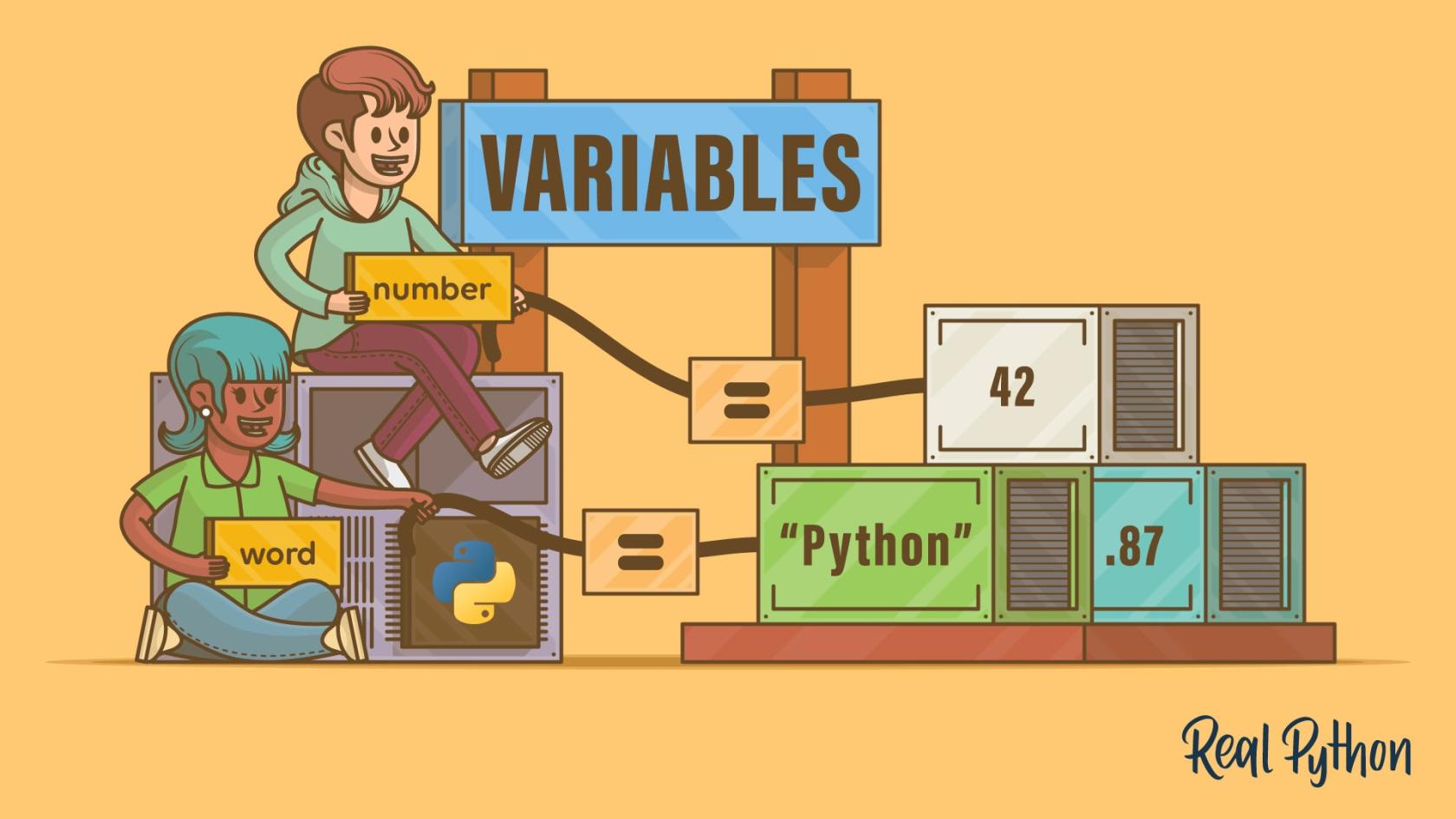
Concept: Initializing Variables
Creating a variable or initializing it, is one of the most fundamental concepts in programming. In Python, you can initialize a variable by simply writing down a name and assigning a value to it using the assignment operator =.
The assignment operator = expects a variable name on the left side and a value on the right side.
my_first_variable = "Hello World"When you write
server_ip = "192.168.1.1"Python does the following:
- It creates a String object in memory containing the value "192.168.1.1".
- It creates a Reference (Label) called server_ip.
- It points that label to the object in memory.
If you later write
server_ip = "10.0.0.1"Python does not change the old string; it creates a new string object and moves the label to the new object. The old value is that orphaned since nothing points to it anymore, this signals the PVM that that value can be garbage collected (deleted) to free up memory.
Dynamic Typing vs. Static Typing
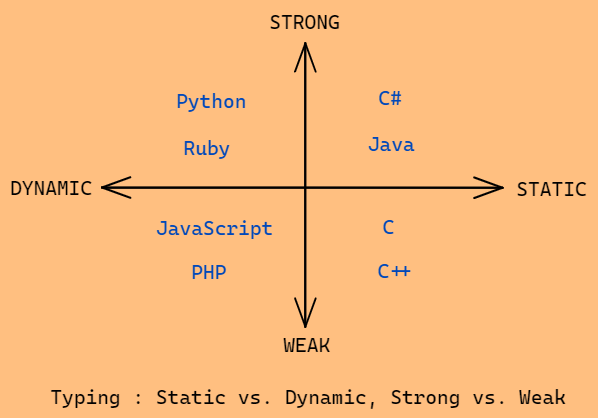
Unlike languages like C# or Java, where you must declare a variable’s type (e.g., int age = 25;), Python is dynamically typed. You can assign a number to a variable and later assign a string to that same variable.
While flexible, this can lead to “Type Errors.” For example, if you try to add a number to a string, Python will crash. As a professional administrator, you must be mindful of the data types you are handling, especially when reading configuration files or API responses.
Naming variables
Concept: Naming Variables
When naming variables in Python, there are some important rules you should keep in mind:
- Variable names can only start with a letter or an underscore (
_), not a number. - Variable names can only contain alphanumeric characters (
a-z,A-Z,0-9) and underscores (_). - Variable names are case-sensitive —
age,Age, andAGEare all considered unique. - Variable names cannot be one of Python's reserved keywords such as
if,class, or `def.
While the following are the hard rules, there are also some soft rules that are widely accepted in the Python community:
- Variables names should be in lowercase, with separate words separated by an underscore. This is called snake case.
- Use descriptive names for variables. For example, if you want to save a user's age as a variable,
user_ageis better thanageor an abbreviation likeua. - Avoid using single-character variable names except for iteration variables of the parameter of simple labmda functions.
If you break any of the hard rules, your Python program will throw a SyntaxError:
Core Data Types
Before working with Python variables, it's important to understand data types. A data type describes the kind of value a variable holds. For example, a number, a piece of text, or a list of items. Programming languages use data types so they know how to store and work with different kinds of information.
Python is a dynamically-typed language like JavaScript, meaning you don't need to explicitly declare types for variables. The language knows what data type a variable is based on what you assign to it.
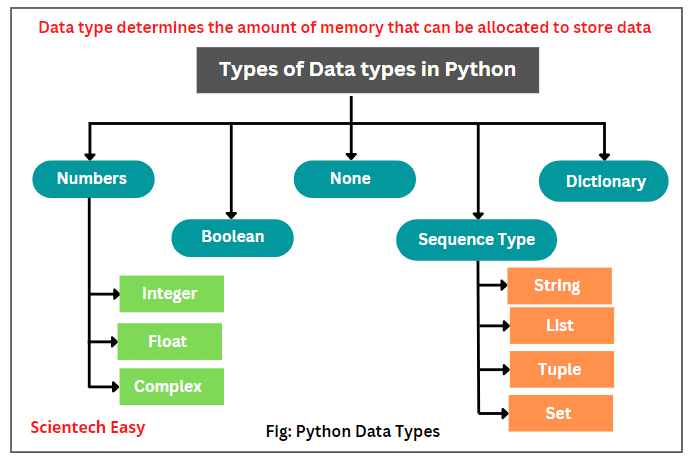
The dynamic-typing nature of Python makes coding really fast and more flexible, but it can lead to unexpected bugs because type errors are detected only when a program runs, not when the program compiles.
Since Python determines data types while your program is running, type-related mistakes are only discovered at that moment. When a program runs, Python executes your code line by line. If it reaches a line where a certain object is expected to behave in a way it's not able to, Python will stop and show an error.
In contrast, some languages compile your program before it runs. Compiling means the computer checks your code in advance and prepares it to run. During this step, those languages can catch type errors before the program even starts.
Those languages are less suitable for system administrators and therefore fall outside the scope of this course. The important idea is simply:
- In Python type errors can reveal themselves during execution, when the program is actually running and using your code.
- Compiled languages catch type errors during the compile step, before the program is allowed to run.
Because of this, you might not learn about a type mistake in Python until the program reaches that specific line of code while running. While this can be annoying, it is less so that the verbosity which statically typed languages introduce.
The runtime type can be retrieved at runtime using the type function, as demonstrated below for each of the four primary data types.
In the context of infrastructure management, four primary data types appear most frequently. 3.2.1 Strings (str)
Strings are sequences of characters wrapped in single (') or double (") quotes. In sysadmin tasks, strings are used for IP addresses, hostnames, usernames, and log messages. 1 2 3 4 5 greeting_1 = "Hello World!" greeting_2 = 'Hello Universe!'
print (type (greeting_1)) # <class 'str'> print (type (greeting_2)) # <class 'str'>
If you need a multi-line string, you can use triple double quotes or single quotes: 1 2 3 4 5 my_str_3 = """Multiline string""" my_str_4 = '''Another multiline string'''
If your string contains either single or double quotation marks, then you have two options:
Use the opposite kind of quotes. That is, if your string contains single quotes, use double quotes to wrap the string, and vice versa:
1 2 msg = "It's a sunny day" quote = 'She said, "Hello World!"'
Escape the single or double quotation mark in the string with a backslash (\). With this method, you can use either single or double quotation marks to wrap the string itself:
1 2 msg = 'It's a sunny day' quote = "She said, "Hello!""
Sometimes, you may need to check if a string contains one or more characters. For that, Python provides the in operator, which returns a boolean that specifies whether the character or characters exist in the string or not.
Here are some examples:
The print function which we use below, takes an argument (between parentheses ()), and prints it to stdout (the terminal in most cases). 1 2 3 4 5 6 7 8 my_str = 'Hello world'
print ('Hello' in my_str) # True print ('hello' in my_str) # False print ('hey' in my_str) # False print ('hi' in my_str) # False print ('e' in my_str) # True print ('f' in my_str) # False
Now, let's look at how you can get the length of a string and work with the individual characters in a string, a process called indexing. To get the length of a string, you can use the built-in len ()function. Here's an example: 1 2 my_str = 'Hello world' print (len (my_str)) # 11
Each character in a string has a position called an index. The index is zero-based, meaning that the index of the first character of a string is 0, the index of the second character is 1, and so on. To access a character by its index, you use square brackets ([]) with the index of the character you want to access inside. Here are some examples: 1 2 3 4 my_str = "Hello world"
print (my_str[0]) # H print (my_str[6]) # w
Negative indexing is also allowed, you can get the last character of any string with -1, the second-to-last character with -2, and so on: 1 2 3 my_str = 'Hello world' print (my_str[-1]) # d print (my_str[-2]) # l
Many other programming languages group data types broadly as either primitive or reference types. Primitive types are simple and immutable, meaning they can't be changed once declared. Reference types can hold multiple values, and are either mutable or immutable. But Python doesn't draw a hard line between those two groups. Instead, all data gets treated as objects, and some objects are immutable while others are mutable.
Immutable data types can't be modified or altered once they're declared. You can point their variables at something new, which is called reassignment, but you can't change the original object itself by adding, removing, or replacing any of its elements.
Strings are immutable data types in Python. This means that you can reassign a different string to a variable: 1 2 3 greeting = 'hi' greeting = 'hello' print (greeting) # hello
But direct modification of a string isn't allowed: 1 2 greeting = 'hi' greeting[0] = 'H' # TypeError: 'str' object does not support item assignment
Essential String Operations:
Concatenation: Joining strings using +.
F-Strings (Formatted Strings): The modern way to inject variables into strings.
    Example: print(f"Connecting to {hostname} on port {port}...")
Methods: Strings have built-in tools like .upper(), .lower(), .strip() (to remove whitespaces from a config file), and .split() (to turn a CSV line into a list).
3.2.2 Integers (int)
Integers are whole numbers. You will use these for port numbers, timeout values, and counting the number of servers in a cluster.
Integers are whole numbers without decimal points, either positive or negative: 1 2 3 4 5 my_int_1 = 56 my_int_2 = -4
print (type (my_int_1)) # <class 'int'> print (type (my_int_2)) # <class 'int'>
Here's how to perform an addition operation with integers: 1 2 3 4 5 my_int_1 = 56 my_int_2 = 12
sum_ints = my_int_1 + my_int_2 print ('Integer Addition:', sum_ints) # Integer Addition: 68
Here's how to perform a subtraction with integers: 1 2 3 4 5 6 my_int_1 = 56 my_int_2 = 12
Subtraction
diff_ints = my_int_1 - my_int_2 print ('Integer Subtraction:', diff_ints) # Integer Subtraction: 44
Here's how to perform a multiplication operation with integers: 1 2 3 4 5 6 my_int_1 = 12 my_int_2 = 4
Multiplication
product_ints = my_int_1 * my_int_2 print ('Integer Multiplication:', product_ints) # Integer Multiplication: 48
And here's how to perform a division operation with integers: 1 2 3 4 5 6 my_int_1 = 56 my_int_2 = 12
Division
div_ints = my_int_1 / my_int_2 print ('Division:', div_ints) # Division: 4.666666666666667 3.2.3 Floats (float)
Floats are decimal numbers. These are critical for monitoring metrics, such as CPU load (e.g., 0.75) or memory usage percentages.
Floats are positive or negative numbers with decimal points, like 3.14, -0.5, or 0.0. 1 2 3 4 5 my_float_1 = -12.0 my_float_2 = 4.9
print (type (my_float_1)) # <class 'float'> print (type (my_float_2)) # <class 'float'>
Here's an addition operation with floats: 1 2 3 4 5 my_float_1 = 5.4 my_float_2 = 12.0
float_addition = my_float_1 + my_float_2 print ('Float Addition:', float_addition) # Float Addition: 17.4
Here's a subtraction operation with floats: 1 2 3 4 5 my_float_1 = 5.4 my_float_2 = 12.0
float_subtraction = my_float_2 - my_float_1 print ('Float Subtraction:', float_subtraction) # Float Subtraction: 6.6
Here's a multiplication operation with floats: 1 2 3 4 5 my_float_1 = 5.4 my_float_2 = 12.0
float_multiplication = my_float_2 * my_float_1 print ('Float Multiplication:', float_multiplication) # Float Multiplication: 64.80000000000001
And here's a division operation with floats: 1 2 3 4 5 my_float_1 = 5.4 my_float_2 = 12.0
float_division = my_float_2 / my_float_1 print ('Float Division:', float_division) # Float Division: 2.222222222222222
If you add an integer and a float, the result is automatically converted to a float: 1 2 3 4 5 6 7 my_int = 56 my_float = 5.4
sum_int_and_float = my_int + my_float
print (sum_int_and_float) # 61.4 print (type (sum_int_and_float)) # <class 'float'>
This is true for other basic arithmetic operations, too, like subtraction, multiplication, and division. If you mix integers and floats, Python will return a float as the result.
You can also perform more complex arithmetic calculations such as getting the remainder of two numbers with the modulo operator, floor division, and exponentiation with both integers and floats.
The modulo operator (%) returns the remainder when the value on the left is divided by the value on the right: 1 2 3 4 5 6 7 8 9 10 11 my_int_1 = 56 my_int_2 = 12
my_float_1 = 5.4 my_float_2 = 12.0
mod_ints = my_int_1 % my_int_2 mod_floats = my_float_2 % my_float_1
print ('Integer Modulo:', mod_ints) # Integer Modulo: 8 print ('Float Modulo:', mod_floats) # Float Modulo: 1.1999999999999993
Floor division divides two numbers and returns the greatest integer less than or equal to the result. This is done with the double forward slash operator (//): 1 2 3 4 5 6 7 8 9 10 11 my_int_1 = 56 my_int_2 = 12
my_float_1 = 5.4 my_float_2 = 12.0
floor_div_ints = my_int_1 // my_int_2 floor_div_floats = my_float_2 // my_float_1
print ('Integer Floor Division:', floor_div_ints) # Integer Floor Division: 4 print ('Float Floor Division:', floor_div_floats) # Float Floor Division: 2.0
Exponentiation raises a number to the power of another, and is done with the double asterisk operator (**): 1 2 3 4 5 6 7 8 9 10 11 my_int_1 = 56 my_int_2 = 12
my_float_1 = 5.4 my_float_2 = 12.0
exp_ints = my_int_1 ** my_int_2 exp_floats = my_float_1 ** my_float_2
print ('Integer Exponentiation:', exp_ints) # Integer Exponentiation: 951166013805414055936 print ('Float Exponentiation:', exp_floats) # Float Exponentiation: 614787626.1765089
Sometimes, you might notice that the result of an operation involving floats has more decimal digits than expected. For example, the sum 0.1 + 0.2 equals 0.30000000000000004 instead of 0.3.
This happens because numbers are stored in binary format, and some fractions cannot be represented exactly in binary. As a result, they are stored as finite approximations, in the same way the fraction 1/3 cannot be represented with a finite number of digits in decimal and is truncated after a certain number of its infinite digits (0.33333...).
This leads to small rounding errors.
Python also provides built-in functions for converting either numeric data or strings into integers or floats.
The float () function returns a floating-point number constructed from the given number: 1 2 3 4 5 my_int_1 = 56 my_float_1 = float (my_int_1)
print (my_float_1) # 56.0 print (type (my_float_1)) # <class 'float'>
The int () function returns an integer constructed from the given number: 1 2 3 4 5 my_float = 12.92563 my_int = int (my_float)
print (my_int) # 12 print (type (my_int)) # <class 'int'>
Also, you can use the same built-in functions to convert a string into either a float or integer: 1 2 3 4 5 6 7 8 my_str_int = '45' my_str_float = '7.8'
converted_int = int (my_str_int) converted_float = float (my_str_float)
print (converted_int, type (converted_int)) # 45 <class 'int'> print (converted_float, type (converted_float)) # 7.8 <class 'float'>
Here are some other functions Python provides for working with integers and floats.
round(): Rounds a number to the specified number of decimal places. By default this function rounds to the nearest integer, and returns a whole number with no decimal places:
1 2 3 4 5 6 7 8 my_int_1 = 4.798 my_int_2 = 4.253
rounded_int_1 = round (my_int_1) rounded_int_2 = round (my_int_2, 1)
print (rounded_int_1) # 5 print (rounded_int_2) # 4.3
abs(): returns the absolute value of a number,
1 2 3 4 num = -15
absolute_value = abs (num) print (absolute_value) # 15
pow(): raises a number to the power of another or performs modular exponentiation.
1 2 3 4 5 result_1 = pow (2, 3) # Equivalent to 2 ** 3 print (result_1) # 8
result_2 = pow (2, 3, 5) # (2 ** 3) % 5 print (result_2) # 3 3.2.4 Booleans (bool)
Booleans represent one of two values: True or False. These are the “switches” or "flags" of your script.
Conditional statements, or conditionals, let you control the flow of your program based on whether certain conditions are true or false.
But before we get into all that, let's go over the basic building blocks of conditional statements, starting with comparison operators. Comparison operators are operators that let you compare two or more values, and return a boolean value.
Here's a table with the comparison operators in Python: Operator Name Description == Equal Checks if two values are equal != Not equal Checks if two values are not equal
Greater than Checks if the value on the left is greater than the value on the right < Less than Checks if the value on the left is less than the value on the right = Greater than or equal Checks if the value on the left is greater than or equal to the value on the right <= Less than or equal Checks if the value on the left is less than or equal to the value on the right
Here are some of those expressions that evaluate to True or False: 1 2 3 4 5 6 7 print (3 > 4) # False print (3 < 4) # True print (3 == 4) # False print (4 == 4) # True print (3 != 4) # True print (3 >= 4) # False print (3 <= 4) # True
These operators can be used in conditionals to compare values and run certain code based on whether the conditional evaluates to True or False.